Best GAOMON Drawing Tablets with Full-Laminated in 2026: 2 Picks
Finding the best GAOMON drawing tablets with full laminated displays requires looking at specific hardware details.

What this report covers
- Last updated
- 4 Nov 2026
Figures above are read from the product listings for the models named below. Scores are out of 10, based on listed specifications and buyer feedback.
As Amazon Associates, we earn from qualifying purchases. This means we may receive a small commission at no extra cost to you if you click through and make a purchase.
As an Amazon Associate we earn from qualifying purchases. Links on this page are affiliate links.
Finding the best GAOMON drawing tablets with full laminated displays requires looking at specific hardware details. We compared 2 models based strictly on the specifications published on their listings. The GAOMON PD2200 21.5-Inch Drawing Tablet leads this list because its large 21.5-inch screen offers a spacious canvas for professional work. This size provides ample room for detailed projects without compromising on color accuracy. You need to know which dimensions and features match your workflow. This guide helps you decide which pen display fits your desk setup and creative needs.
Screen size drives your choice
You should pick your screen size first. The 21.5-inch PD2200 offers a large desktop canvas for stationary work. It weighs 8.49 pounds. The 15.6-inch PD156Pro is lighter at 2.87 pounds. It fits better if you need portability. Both models feature full-laminated displays. Choose based on your workspace and mobility needs.
| # | Product | Best for | Price |
|---|---|---|---|
| 1 | GAOMON PD2200 21.5-Inch Drawing Tablet Best overall | large desktop canvas and color accuracy | |
| 2 | GAOMON PD156Pro 15.6" Full-Laminated Tablet Best 15.6-inch | artists needing a portable, color-accurate pen display |
The best fit for you
- You need a large desktop canvas for stationary work – GAOMON PD2200 21.5-Inch Drawing Tablet – The 21.5-inch full-laminated display offers ample space for detailed drawing tasks.
- You want a portable tablet with physical shortcut controls – GAOMON PD156Pro 15.6" Full-Laminated Tablet – This 15.6-inch model includes a dial and weighs only 2.87 pounds for easy transport.
- You require a battery-free pen with tilt support – GAOMON PD2200 21.5-Inch Drawing Tablet – The included stylus pen requires no charging and supports tilt for natural shading.
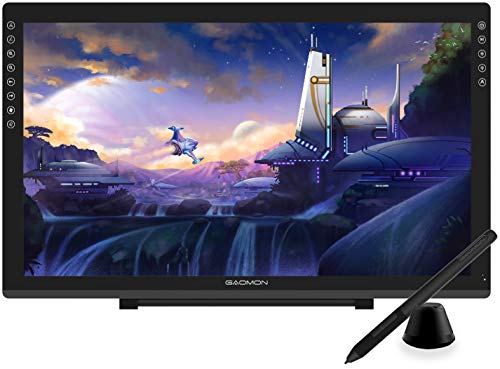
GAOMON PD2200 21.5-Inch Drawing Tablet
Best for: large desktop canvas and color accuracy
- Display
- Full-Laminated
- Tablet Type
- Tethered pen display
- Screen Size
- 21.5 inch
- Pen Pressure
- 8192 levels
- Color Gamut
- 130% sRGB, 92% NTSC
- Display Finish
- Full-laminated, anti-glare film
The GAOMON PD2200 is a 21.5-inch pen display with a full-laminated screen and 130% sRGB color gamut. You get 8192 levels of pressure sensitivity and tilt support from a battery-free pen. The device features eight customizable touch shortcut keys and a full glass front. It requires a computer to operate and supports Windows and Mac systems for digital art and design.
- 21.5-inch full-laminated display with 130% sRGB coverage
- 8192 levels of pressure sensitivity with tilt support
- Battery-free stylus pen included
- Eight customizable touch shortcut keys
- Full glass front design without PVC frames
- Heavier at 8.49 pounds compared to smaller models
- Thicker profile at 0.1 inches in this configuration
- Requires connection to a computer to function
- You need a large 21.5-inch canvas for detailed work
- You want a full-laminated screen with high color accuracy
- You prefer a battery-free pen with tilt support
- You require a standalone tablet without a computer
- You need a portable device under 16 inches
- You prioritize a lightweight setup under 5 pounds
Verdict: GAOMON PD2200 21.5-Inch Drawing Tablet fits professionals who need a large, color-accurate display for stationary desk work. It suits those who value a full glass surface and customizable shortcuts over portability.
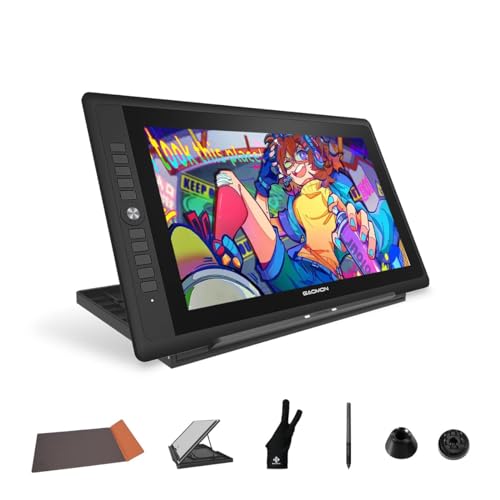
GAOMON PD156Pro 15.6" Full-Laminated Tablet
Best for: artists needing a portable, color-accurate pen display
- Display
- Full-Laminated
- Tablet Type
- Tethered pen display
- Screen Size
- 15.6 inch
- Display Resolution
- 1920 x 1080 FHD
- Pen Pressure
- 8192 levels
- Color Gamut
- 120% sRGB
The GAOMON PD156Pro is a 15.6-inch full-laminated pen display with a 1920×1080 resolution and 120% sRGB color gamut. It features a battery-free stylus with 8192 pressure levels and tilt support. You get ten programmable shortcut keys and a control dial for workflow efficiency. The device connects via a single cable and weighs 2.87 pounds. It is a practical choice for digital artists needing a portable, color-accurate screen.
- 15.6-inch full-laminated display with 120% sRGB color gamut
- Battery-free stylus with 8192 pressure levels and tilt support
- Includes a control dial and ten programmable shortcut keys
- Single-cable connection for simplified setup
- Lightweight design at 2.87 pounds for portability
- 120% sRGB color gamut is lower than the 130% found on the 21.5-inch model
- 1080p resolution is standard for this size compared to higher options
- Requires connection to a computer to function
- You need a full-laminated screen with accurate color reproduction
- You prefer physical shortcut keys and a dial for efficiency
- You want a portable display under 3 pounds
- You require a standalone device without a computer
- You need a color gamut exceeding 120% sRGB
- You prefer a larger 21.5-inch viewing area
Verdict: GAOMON PD156Pro 15.6-Inch Pen Display is a solid mid-size option for artists who value a balance of portability and color accuracy. It suits those who want physical controls and a lightweight build for their digital workflow.
Specifications side by side
| Spec | GAOMON PD2200 21.5-Inch Drawing Tablet | GAOMON PD156Pro 15.6" Full-Laminated Tablet |
|---|---|---|
| Tablet Type | Tethered pen display | Tethered pen display |
| Screen Size | 21.5 inch | 15.6 inch |
| Display Resolution | – | 1920 x 1080 FHD |
| Pen Pressure | 8192 levels | 8192 levels |
| Color Gamut | 130% sRGB, 92% NTSC | 120% sRGB |
| Display Finish | Full-laminated, anti-glare film | Full-laminated, anti-glare film |
| Shortcut Controls | 8 touch shortcut keys | 10 shortcut keys, 1 dial key |
| Operating System | Windows | Windows |
| Features | Stylus, Stylus Pen, Battery-Free Pen, Shortcut Keys, Tilt Support | Stylus, Stylus Pen, Battery-Free Pen, Tilt Support, Dial |
| Display | Full-Laminated | Full-Laminated |
| Color | Black | Black |
| Dimensions | 20.6 × 12.4 × 0.1 inches | 13.5 × 7.62 × 0.1 inches |
| Weight | 8.49 pounds | 2.87 pounds |
| Size | 21.5 inch | 15.6 Inch |
| Model | GAOMON PD2200 | A2.PD156P-0-EN0000-0-1-CY-0 |
How to choose the right one
Check the operating system
You must verify that your computer is compatible with the tablet before you buy. Both the PD2200 and PD156Pro require Windows. If you use a Mac or iPad, these models will not work with your setup. You should check your current system version to ensure smooth driver installation. Incorrect compatibility can prevent the stylus from functioning correctly. Always confirm the operating system requirement matches your device to avoid connectivity issues during your creative workflow.
Consider tilt support
Tilt support allows the stylus to detect angle changes for natural shading. Both listed GAOMON models include this feature. You get realistic brush strokes when you tilt the pen. This specification is crucial for artists who simulate traditional media like charcoal or pencils. Check that the product data confirms tilt capability. Without it, your lines may look flat. This feature enhances the drawing experience significantly. You should prioritize models that explicitly list tilt support in their attributes for better artistic control.
Look for physical controls
Physical controls help you work faster without moving your hand to the keyboard. The PD156Pro includes a dial for easy navigation. You can adjust brush size or zoom with a simple turn. The PD2200 offers shortcut keys instead. You should choose based on your preference for dials versus keys. These features streamline your workflow. Check the attributes section for these details. Having dedicated controls reduces fatigue. You spend less time searching menus and more time creating. This distinction matters for long drawing sessions.
Verify battery-free pen
A battery-free pen ensures you never face a dead tool mid-project. Both models feature battery-free styluses. You do not need to charge the pen or replace batteries. This reliability is essential for professional work. You can draw for hours without interruption. Check the features list to confirm this specification. It saves you time and money. You focus on your art instead of maintenance. This spec is a standard benefit for modern pen displays. You should look for this detail to ensure consistent performance.
Assess weight for portability
Weight determines how easy it is to move your tablet. The PD156Pro weighs 2.87 pounds. It is light enough for travel. The PD2200 weighs 8.49 pounds. It is heavy and stays on your desk. You should choose the lighter model if you travel. Pick the heavier one for a fixed studio. Check the specs for exact weight. This factor impacts your setup flexibility. You want a device that fits your lifestyle. Portability is key for mobile artists. Stationary users prefer larger, heavier displays.
Frequently asked questions
Do GAOMON full-laminated tablets support tilt?
Yes, both listed models support tilt. The PD2200 includes tilt support for natural shading. The PD156Pro also features tilt support. This allows you to vary line width based on pen angle. It mimics traditional brush behavior.
Are the stylus pens battery-free?
Yes, both tablets use battery-free pens. The PD2200 features a battery-free stylus pen. The PD156Pro also includes a battery-free pen. You do not need to charge them. This ensures consistent pressure sensitivity without interruption.
Which operating systems are compatible?
Both tablets require Windows. The PD2200 operates on Windows. The PD156Pro also runs on Windows. They are not compatible with macOS or iPadOS. You must verify your computer runs Windows before purchasing either model.
Does the PD156Pro have a dial?
Yes, the PD156Pro includes a dial. It is listed as a key feature. This dial provides physical controls for your workflow. The PD2200 does not list a dial. It relies on shortcut keys instead. The dial helps adjust settings quickly.
What is the weight difference between models?
The PD2200 weighs 8.49 pounds. The PD156Pro weighs 2.87 pounds. This makes the PD156Pro much lighter. It is easier to transport. The PD2200 is heavier and suited for stationary desk use. Portability favors the smaller model.
Is the display full-laminated on both?
Yes, both tablets have full-laminated displays. The PD2200 features a full-laminated screen. The PD156Pro also uses full lamination. This reduces parallax between the pen tip and cursor. It improves drawing accuracy on both devices.
Do these tablets include shortcut keys?
The PD2200 includes shortcut keys. It lists them as a feature. The PD156Pro lists a dial instead. It may have other controls not specified. The PD2200 offers customizable shortcuts for frequent tasks. Check the specific feature list for your needs.


