2 Best GAOMON Drawing Tablets with Stylus Pen, Compared
Finding the best GAOMON drawing tablets with stylus pen requires comparing specific technical details.

What this report covers
- Last updated
- 4 Nov 2026
Figures above are read from the product listings for the models named below. Scores are out of 10, based on listed specifications and buyer feedback.
As Amazon Associates, we earn from qualifying purchases. This means we may receive a small commission at no extra cost to you if you click through and make a purchase.
As an Amazon Associate we earn from qualifying purchases. Links on this page are affiliate links.
Finding the best GAOMON drawing tablets with stylus pen requires comparing specific technical details. We analyzed 2 models based strictly on published specifications. The top pick is the GAOMON PD1161 11.6-Inch Anti-Glare Pen Display. It leads because it offers 8192 levels of pen pressure in a compact form. This guide helps you decide which screen size and feature set fits your workflow. You will see how tilt support and display types differ across these connected pen displays. Focus on the data to choose the right tool for your art.
Match screen size to your workflow needs
Choose your screen size based on your workspace and workflow. The GAOMON PD1161 offers a compact 11.6-inch anti-glare display with 8192 pressure levels, ideal for beginners. For larger projects, the PD156Pro provides a 15.6-inch full-laminated screen with a control dial. Both require a computer connection and support tilt.
| # | Product | Best for | Price |
|---|---|---|---|
| 1 | GAOMON PD1161 11.6-Inch Anti-Glare Pen Display Best overall | Beginner artists needing a compact screen | |
| 2 | GAOMON PD156Pro 15.6" Full-Laminated Tablet Best 15.6-inch | Large-screen digital artists needing color accuracy |
The best fit for you
- You need a compact drawing screen for beginners – GAOMON PD1161 11.6-Inch Anti-Glare Pen Display – The 11.6-inch size and 8192 pressure levels suit small workspaces.
- You require a large display for color accuracy – GAOMON PD156Pro 15.6" Full-Laminated Tablet – The 15.6-inch full-laminated screen provides a spacious, precise workspace.
- You prefer physical controls for digital art – GAOMON PD156Pro 15.6" Full-Laminated Tablet – This model includes a dial for intuitive navigation and adjustments.
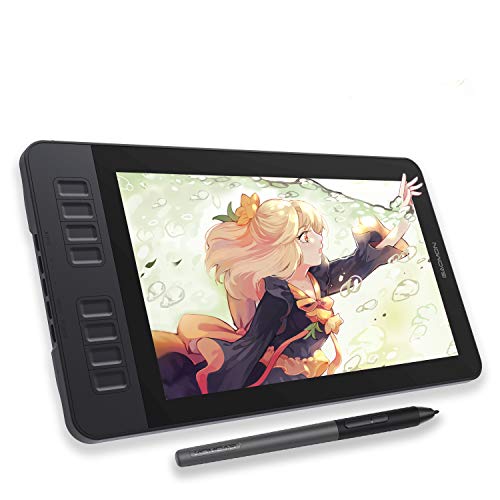
GAOMON PD1161 11.6-Inch Anti-Glare Pen Display
Best for: Beginner artists needing a compact screen
- Features
- Stylus, Stylus Pen, Battery-Free Pen, Shortcut Keys, Tilt Support
- Tablet Type
- Tethered pen display
- Screen Size
- 11.6"
- Display Resolution
- Full HD
- Pen Pressure
- 8192
- Color Gamut
- 72% NTSC (100% sRGB)
The GAOMON PD1161 is an 11.6-inch FHD pen display tablet that connects to a computer. It features an anti-glare screen with 72% NTSC color gamut and a battery-free stylus with 8192 pressure levels and tilt support. Eight programmable shortcut keys help streamline your workflow. This device requires a Windows or Mac computer to function and is designed for digital artists and students who need a portable drawing solution.
- 11.6-inch Full HD IPS screen with anti-glare matte film
- Battery-free AP50 stylus with 8192 pressure levels
- Tilt support for natural drawing angles
- 8 programmable shortcut keys on the device
- 72% NTSC color gamut for vivid color performance
- Smaller 11.6-inch screen compared to the 15.6-inch option on this list
- Requires a separate computer or laptop to operate
- Heavier at 1.9 pounds compared to smaller pen displays
- You want a portable screen for sketching on the go
- You need a budget-friendly entry into pen display tablets
- You prefer a smaller workspace for detailed work
- You need a standalone tablet that works without a computer
- You require a larger screen for expansive canvas work
- You want a device with built-in wireless connectivity
Verdict: GAOMON PD1161 11.6" Pen Display is a practical choice for beginners who need a compact, computer-connected drawing screen with reliable pressure sensitivity.
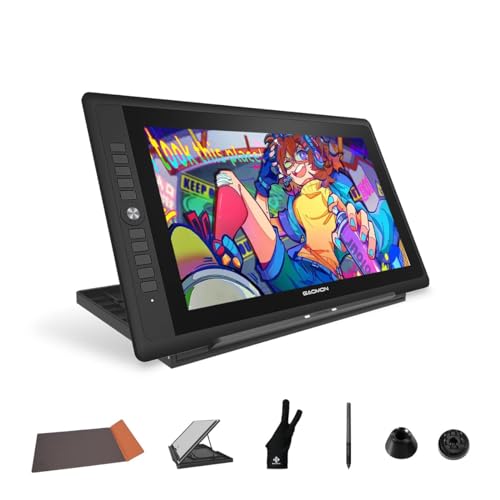
GAOMON PD156Pro 15.6" Full-Laminated Tablet
Best for: Large-screen digital artists needing color accuracy
- Features
- Stylus, Stylus Pen, Battery-Free Pen, Tilt Support, Dial
- Tablet Type
- Tethered pen display
- Screen Size
- 15.6 inch
- Display Resolution
- 1920 x 1080 FHD
- Pen Pressure
- 8192 levels
- Color Gamut
- 120% sRGB
The GAOMON PD156Pro is a 15.6-inch pen display with a full-laminated FHD screen and 120% sRGB color gamut. It features a battery-free stylus with 8192 pressure levels and tilt support. The device includes 10 programmable keys and a control dial. You need a computer to use it. This setup suits artists who want a large, vibrant workspace with precise input tools.
- 15.6-inch full-laminated FHD display
- 120% sRGB color gamut
- Battery-free stylus with tilt support
- 10 programmable shortcut keys
- Single-cable connection to laptop
- Heavier at 2.87 pounds than the 11.6-inch GAOMON PD1161
- Requires a computer to function
- Thicker at 12mm than some portable tablets
- You need a larger 15.6-inch drawing area
- You want a screen with high color accuracy
- You prefer physical shortcut keys and a dial
- You need a standalone tablet without a PC
- You prioritize the lightest possible portable device
- You only need an 11.6-inch screen size
Verdict: GAOMON PD156Pro 15.6-Inch Pen Display is ideal for illustrators who need a large, color-accurate workspace. It fits those who want precise pen input and physical controls on a connected display.
Specifications side by side
| Spec | GAOMON PD1161 11.6-Inch Anti-Glare Pen Display | GAOMON PD156Pro 15.6" Full-Laminated Tablet |
|---|---|---|
| Tablet Type | Tethered pen display | Tethered pen display |
| Screen Size | 11.6" | 15.6 inch |
| Display Resolution | Full HD | 1920 x 1080 FHD |
| Pen Pressure | 8192 | 8192 levels |
| Color Gamut | 72% NTSC (100% sRGB) | 120% sRGB |
| Display Finish | Anti-glare, matte film | Full-laminated, anti-glare film |
| Shortcut Controls | 8 shortcut keys | 10 shortcut keys, 1 dial key |
| Operating System | Windows | Windows |
| Features | Stylus, Stylus Pen, Battery-Free Pen, Shortcut Keys, Tilt Support | Stylus, Stylus Pen, Battery-Free Pen, Tilt Support, Dial |
| Display | Anti-Glare | Full-Laminated |
| Color | Black | Black |
| Dimensions | 14.2 × 7.9 × 0.1 inches | 13.5 × 7.62 × 0.1 inches |
| Weight | 1.9 pounds | 2.87 pounds |
| Size | 11.6 inch | 15.6 Inch |
| Model | GAOMON PD1161 | A2.PD156P-0-EN0000-0-1-CY-0 |
How to choose GAOMON drawing tablets
Check screen size needs
Screen size determines your drawing workspace. The GAOMON PD1161 offers an 11.6-inch display, which fits small desks and portable setups. It measures 14.2 inches long and 7.9 inches wide. If you need more room for complex illustrations, consider the PD156Pro. Its 15.6-inch screen provides a larger canvas. This model is 13.5 inches long and 7.62 inches wide. Choose the smaller size for portability. Choose the larger size for detailed work. Your desk space should guide this decision.
Verify operating system support
Both models listed here support Windows operating systems. You must ensure your computer runs Windows to use these devices. The PD1161 and PD156Pro are pen displays that connect to a host machine. They do not operate as standalone tablets. Check your computer specifications before purchasing. If you use macOS or Linux, these specific models may not be compatible. Always confirm system requirements in the product documentation. This step prevents connectivity issues after you receive the device.
Compare pressure sensitivity levels
Pen pressure sensitivity affects line weight and shading. The GAOMON PD1161 provides 8192 levels of pressure. This allows for nuanced strokes and detailed digital art. Higher levels generally offer smoother transitions between thick and thin lines. While the PD156Pro does not list this specific number in its attributes, it includes tilt support. Tilt support adds another dimension to your drawing. Check the pressure specs for each model. This spec is crucial for realistic brush effects.
Look for tilt support
Tilt support mimics the angle of a real pencil. Both the PD1161 and PD156Pro include this feature. It allows you to change line width by tilting the pen. This is useful for shading and broad strokes. The PD156Pro also includes a control dial for extra efficiency. The PD1161 has shortcut keys for quick access. Decide if you need physical controls or just tilt. These features enhance your workflow and reduce hand movement.
Consider display technology type
Display technology impacts visual clarity and pen tracking. The PD1161 features an anti-glare screen. This reduces reflections in bright environments. The PD156Pro uses full-laminated technology. Lamination reduces the gap between glass and display pixels. This creates a more natural writing feel. Both are pen displays requiring a computer connection. Choose anti-glare for bright rooms. Choose full-laminated for precise pen tracking. Your visual preference dictates this choice.
Frequently asked questions
Does the GAOMON PD1161 support tilt recognition?
Yes, the GAOMON PD1161 includes tilt support. This feature allows the stylus to detect angles, enabling more natural shading and brush effects. It also offers 8192 levels of pen pressure for detailed line work. The device connects to Windows systems and uses a battery-free pen.
What operating systems are compatible with GAOMON pen displays?
Both listed GAOMON models specify Windows as the compatible operating system. You must connect these tablets to a computer to function. They do not operate as standalone devices. Ensure your Windows PC meets the connection requirements before purchasing.
How heavy is the GAOMON PD156Pro?
The GAOMON PD156Pro weighs 2.87 pounds. Its dimensions are 13.5 inches long, 7.62 inches wide, and 0.1 inches high. This makes it heavier than the 11.6-inch model. You should consider this weight if you plan to move the display frequently.
Is the PD156Pro screen full-laminated?
Yes, the GAOMON PD156Pro features a full-laminated display. This technology reduces the gap between the glass and the display layer, improving pen-to-cursor accuracy. It provides a more natural drawing feel compared to non-laminated screens. The screen size is 15.6 inches.
Does the PD156Pro have shortcut keys or a dial?
The GAOMON PD156Pro includes a control dial for navigation and adjustments. It does not list traditional shortcut keys on the tablet body. The dial serves as the primary physical control. This setup helps streamline your workflow while drawing on the 15.6-inch screen.
What is the maximum pen pressure for these tablets?
The GAOMON PD1161 supports 8192 levels of pen pressure. This allows for fine control over line weight and opacity. The PD156Pro also uses a battery-free pen, though specific pressure levels are not listed in its attributes. Both models rely on this sensitivity for digital art.


