Best GAOMON Windows Drawing Tablets in 2026: 2 Picks
Finding the best GAOMON windows drawing tablets requires matching specs to your workflow.

What this report covers
- Last updated
- 4 Nov 2026
Figures above are read from the product listings for the models named below. Scores are out of 10, based on listed specifications and buyer feedback.
As Amazon Associates, we earn from qualifying purchases. This means we may receive a small commission at no extra cost to you if you click through and make a purchase.
As an Amazon Associate we earn from qualifying purchases. Links on this page are affiliate links.
Finding the best GAOMON windows drawing tablets requires matching specs to your workflow. We compared 2 models using only published data. The top pick is the GAOMON PD1161 11.6-Inch Anti-Glare Pen Display. It leads because its 8192 levels of pen pressure offer precise control in a compact 11.6-inch frame. This guide helps you decide which device fits your desk size and artistic needs.
Choose screen size for your desk
You should pick the screen size that fits your workspace. The top pick is the 11.6-inch GAOMON PD1161. It has an anti-glare display and 8192 levels of pen pressure. The second option is the 15.6-inch GAOMON PD156Pro. It features a full-laminated screen and a dial for navigation. Your choice depends on whether you need compact portability or large canvas space.
| # | Product | Best for | Price |
|---|---|---|---|
| 1 | GAOMON PD1161 11.6-Inch Anti-Glare Pen Display Best overall | compact digital art setups | |
| 2 | GAOMON PD156Pro 15.6" Full-Laminated Tablet Best 15.6-inch | large-screen digital artists needing dial controls |
The best fit for you
- You need the most compact pen display for small desks – GAOMON PD1161 11.6-Inch Anti-Glare Pen Display – The 11.6-inch anti-glare screen and 1.9-pound weight suit tight workspaces.
- You want a large screen with physical dial controls – GAOMON PD156Pro 15.6" Full-Laminated Tablet – The 15.6-inch full-laminated display and included dial offer precise navigation.
- You require 8192 levels of pen pressure sensitivity – GAOMON PD1161 11.6-Inch Anti-Glare Pen Display – The battery-free stylus provides 8192 pressure levels for detailed line work.
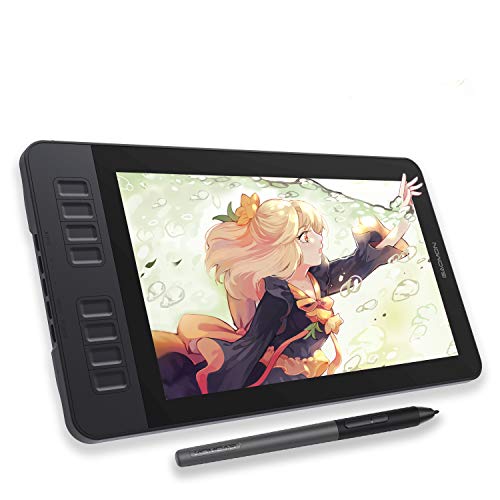
GAOMON PD1161 11.6-Inch Anti-Glare Pen Display
Best for: compact digital art setups
- Operating System
- Windows
- Tablet Type
- Tethered pen display
- Screen Size
- 11.6"
- Display Resolution
- Full HD
- Pen Pressure
- 8192
- Color Gamut
- 72% NTSC (100% sRGB)
The GAOMON PD1161 is an 11.6-inch FHD pen display that connects to your computer for drawing. It features a 72% NTSC color gamut and an anti-glare screen for clear visuals. The battery-free stylus offers 8192 pressure levels and tilt support. Eight programmable shortcut keys help streamline your workflow. This device suits artists who want direct screen drawing without the bulk of a larger monitor.
- 11.6-inch full HD IPS screen with anti-glare finish
- Battery-free stylus with 8192 pressure levels and tilt support
- 72% NTSC color gamut for vivid color performance
- Eight programmable shortcut keys for workflow customization
- Smaller 11.6-inch display compared to the 15.6-inch PD156Pro
- Requires connection to a computer; not a standalone device
- You need a portable drawing screen for your laptop
- You want direct on-screen sketching with a battery-free pen
- You prefer a compact display for limited desk space
- You require a standalone tablet that works without a computer
- You need a larger screen for detailed professional work
- You want a full-laminate display without a matte film
Verdict: The GAOMON PD1161 11.6-Inch Pen Display fits beginners and hobbyists who need a compact, affordable screen for digital art. It provides essential drawing tools in a small form factor. This model is ideal for those with limited workspace. It is less suitable for professionals needing larger canvases.
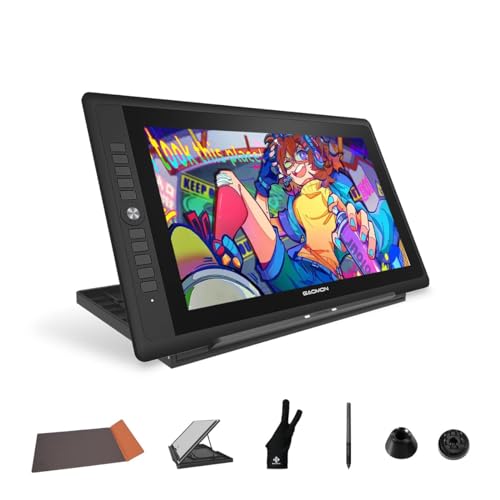
GAOMON PD156Pro 15.6" Full-Laminated Tablet
Best for: large-screen digital artists needing dial controls
- Operating System
- Windows
- Tablet Type
- Tethered pen display
- Screen Size
- 15.6 inch
- Display Resolution
- 1920 x 1080 FHD
- Pen Pressure
- 8192 levels
- Color Gamut
- 120% sRGB
The GAOMON PD156Pro is a 15.6-inch pen display featuring a 1920×1080 screen with 120% sRGB color coverage. It uses full-lamination to reduce parallax and includes a battery-free stylus with 8192 pressure levels and tilt support. You get ten programmable keys and a control dial for workflow efficiency. At 2.87 pounds, it connects via a single cable to Windows or Mac computers for drawing and design work.
- 15.6-inch 1920×1080 display with 120% sRGB gamut
- Full-laminated screen minimizes parallax
- Battery-free stylus with 8192 pressure levels and tilt support
- Includes a control dial and ten programmable shortcut keys
- Single-cable connection simplifies setup
- Heavier at 2.87 pounds compared to the 11.6-inch model
- Requires connection to a computer; not a standalone device
- 1920×1080 resolution is lower than potential 4K alternatives
- You need a larger 15.6-inch canvas for detailed work
- You want physical shortcut keys and a dial for efficiency
- You prefer a single-cable connection to your laptop
- You require a standalone tablet without a host computer
- You need a lighter device under 2 pounds
- You prefer a smaller 11.6-inch screen size
Verdict: GAOMON PD156Pro 15.6-inch Pen Display fits artists who need a large, color-accurate screen with physical controls and do not mind connecting to a computer. It is ideal for those prioritizing screen real estate and dial-based navigation.
Specifications side by side
| Spec | GAOMON PD1161 11.6-Inch Anti-Glare Pen Display | GAOMON PD156Pro 15.6" Full-Laminated Tablet |
|---|---|---|
| Tablet Type | Tethered pen display | Tethered pen display |
| Screen Size | 11.6" | 15.6 inch |
| Display Resolution | Full HD | 1920 x 1080 FHD |
| Pen Pressure | 8192 | 8192 levels |
| Color Gamut | 72% NTSC (100% sRGB) | 120% sRGB |
| Display Finish | Anti-glare, matte film | Full-laminated, anti-glare film |
| Shortcut Controls | 8 shortcut keys | 10 shortcut keys, 1 dial key |
| Operating System | Windows | Windows |
| Features | Stylus, Stylus Pen, Battery-Free Pen, Shortcut Keys, Tilt Support | Stylus, Stylus Pen, Battery-Free Pen, Tilt Support, Dial |
| Display | Anti-Glare | Full-Laminated |
| Color | Black | Black |
| Dimensions | 14.2 × 7.9 × 0.1 inches | 13.5 × 7.62 × 0.1 inches |
| Weight | 1.9 pounds | 2.87 pounds |
| Size | 11.6 inch | 15.6 Inch |
| Model | GAOMON PD1161 | A2.PD156P-0-EN0000-0-1-CY-0 |
How to choose the right GAOMON tablet
Check screen size needs
Screen size determines how much workspace you have. The GAOMON PD1161 offers an 11.6-inch display, which fits small desks well. Its compact dimensions measure 14.2 inches by 7.9 inches. If you need more room, the PD156Pro provides a 15.6-inch screen. This larger size suits artists who prefer a bigger canvas. Measure your desk space before buying. A smaller tablet saves room but limits your drawing area. Choose the size that matches your physical workspace constraints.
Evaluate pen pressure levels
Pen pressure sensitivity affects line variation. The GAOMON PD1161 features 8192 levels of pressure. This allows for subtle changes in line weight. You get precise control over your strokes. Higher levels generally mean smoother transitions between thick and thin lines. Check this spec if you draw detailed illustrations. It impacts the realism of your digital artwork. Both listed models support this level of sensitivity. It is a key factor for accurate digital inking and shading.
Consider display technology
Display type influences visual clarity. The PD1161 uses an anti-glare screen. This reduces reflections in bright rooms. It helps you see your work clearly without distractions. The PD156Pro features a full-laminated display. Lamination often improves touch response and image quality. Compare these options based on your lighting environment. Anti-glare is practical for well-lit studios. Full-lamination may offer a more integrated look. Your visual comfort depends on this specific hardware choice.
Look for physical controls
Physical controls can speed up your workflow. The PD156Pro includes a dial for navigation. This allows you to adjust settings without using the mouse. It is useful for zooming or rotating your canvas. The PD1161 relies on shortcut keys instead. Decide if you prefer tactile dials or button presses. Dials offer continuous adjustment for certain tools. Keys are better for specific commands. Your preference for input methods should guide this decision.
Verify weight and portability
Weight affects how easy the device is to move. The PD1161 weighs 1.9 pounds. It is lighter and easier to reposition. The PD156Pro weighs 2.87 pounds. The heavier model is less portable. If you move your setup often, choose the lighter option. Consider where you will store the tablet. A lighter device is less cumbersome for small spaces. Check the weight spec to ensure it fits your carrying habits.
Frequently asked questions
Which GAOMON drawing tablet is best for small desks?
The GAOMON PD1161 is the best choice for compact setups. It features an 11.6-inch screen that fits tight spaces. The device weighs only 1.9 pounds and measures 14.2 inches by 7.9 inches. Its anti-glare display reduces reflections. This model suits beginners who need portability without sacrificing essential drawing tools.
Does the GAOMON PD156Pro include a dial for navigation?
Yes, the GAOMON PD156Pro includes a physical dial for navigation. This feature helps artists control software functions precisely. The tablet also offers a 15.6-inch full-laminated display for accurate color representation. It connects to your computer and supports tilt recognition. The dial makes it ideal for users who prefer physical controls over screen shortcuts.
What level of pen pressure do these GAOMON tablets support?
The GAOMON PD1161 supports 8192 levels of pen pressure. This high sensitivity allows for precise line weight variations. The PD156Pro also utilizes advanced pressure detection for natural strokes. Both models use battery-free pens that respond to tilt. This ensures accurate line thickness and angle simulation during digital art creation.
Is the GAOMON PD1161 suitable for professional artists?
The GAOMON PD1161 is less suitable for professionals needing large canvases. It is designed for beginners and hobbyists with limited workspace. The 11.6-inch screen provides essential tools in a compact form. Professionals requiring more screen real estate might prefer the larger 15.6-inch PD156Pro. This model offers more space for detailed work and complex compositions.
How heavy is the GAOMON PD156Pro compared to the PD1161?
The GAOMON PD156Pro weighs 2.87 pounds, while the PD1161 weighs 1.9 pounds. The PD156Pro is heavier due to its larger 15.6-inch screen. It measures 13.5 inches by 7.62 inches. The PD1161 is lighter and more portable. Choose the PD156Pro if you prioritize screen size over weight. Pick the PD1161 for easier transport and smaller desk setups.
Do GAOMON drawing tablets work with Windows operating systems?
Yes, both listed GAOMON tablets are compatible with Windows. The PD1161 and PD156Pro are designed for Windows users. They connect to your computer to function as pen displays. You can use them with various drawing software on Windows. Ensure your system meets the connection requirements for optimal performance and feature access.
What type of display does the GAOMON PD156Pro have?
The GAOMON PD156Pro features a full-laminated display. This technology reduces the gap between the glass and the LCD panel. It creates a more natural drawing experience with less parallax. The screen is 15.6 inches wide, providing ample space for detailed artwork. This display type enhances color accuracy and visual clarity for professional digital art.
Does the GAOMON PD1161 have shortcut keys?
Yes, the GAOMON PD1161 includes shortcut keys. These keys allow quick access to common tools and functions. The tablet also supports tilt recognition for dynamic brush effects. You can customize these keys to match your workflow. This feature helps streamline your creative process without interrupting your drawing flow.


