12 Best Standalone Drawing Tablets, Compared
Finding the best standalone drawing tablets requires comparing key specifications that affect your workflow.

What this report covers
- Last updated
- 1 Nov 2026
Figures above are read from the product listings for the models named below. Scores are out of 10, based on listed specifications and buyer feedback.
As Amazon Associates, we earn from qualifying purchases. This means we may receive a small commission at no extra cost to you if you click through and make a purchase.
As an Amazon Associate we earn from qualifying purchases. Links on this page are affiliate links.
Finding the best standalone drawing tablets requires comparing key specifications that affect your workflow. We analyzed 12 models based strictly on the data published in their listings. The XPPen 10.95" Android Drawing Tablet leads because it combines a color screen with 16K pressure levels for portable sketching. This guide helps you decide which device fits your needs. You will see how screen size, weight, and processing power vary across these self-contained units. Use this information to choose a tablet that matches your artistic style and portability requirements.
Choose Screen Size and Storage First
Standalone drawing tablets vary widely in screen size and storage. The XPPen Magic Drawing Pad 12.2 and UGEE UT3 offer larger displays with 256GB storage for detailed work. Smaller models like the Frunsi RubensTab T8 provide portability for beginners. Match the screen size to your workspace and storage to your app library.
| # | Product | Best for | Price |
|---|---|---|---|
| 1 | XPPen 10.95" Android Drawing Tablet Best overall | Portable color sketching and note-taking | |
| 2 | Frunsi RubensTab T11 Pro 10.1-Inch Also great | beginners needing a portable standalone drawing tablet | |
| 3 | XPPen Magic Drawing Pad 12.2" 256GB Best premium | artists seeking a portable high-res canvas | |
| 4 | PicassoTab X11 11-Inch Drawing Tablet Also great | beginners seeking guided learning resources | |
| 5 | UGEE UT3 14.25" 2.4K Standalone Tablet Best 4k | Large canvas standalone digital art | |
| 6 | Frunsi RubensTab T8 8-Inch Standalone Tablet Best budget | beginners needing a portable starter tablet | |
| 7 | XP-Pen Magic Drawing Pad 12.2 Standalone Also great | artists prioritizing portability and screen quality | |
| 8 | Simbans PicassoTab A10 10-Inch Also great | beginners seeking portable sketching | |
| 9 | HUION Kamvas Slate 11 Standalone Tablet Also great | portable artists needing smooth 90Hz display | |
| 10 | Wacom MovinkPad 11 Android Tablet Also great | portable standalone Android drawing | |
| 11 | Callsky-Kids 12-Inch Blue Standalone Tablet Best blue | Beginners needing large, accurate standalone canvas | |
| 12 | HUION Kamvas Slate 11 Standalone Tablet Also great | portable artists needing a 90Hz display |
The best fit for you
- You want the best overall portable sketching device – XPPen 10.95" Android Drawing Tablet – It features a 10.95-inch anti-glare Android display with 16K pen pressure levels.
- You need a large canvas for professional digital art – UGEE UT3 14.25" 2.4K Standalone Tablet – It offers a 14.25-inch 4K display and 256GB storage for detailed work.
- You prefer a compact starter tablet for beginners – Frunsi RubensTab T8 8-Inch Standalone Tablet – It provides an 8-inch octa-core screen ideal for students starting out.
- You prioritize screen smoothness and color accuracy on the go – HUION Kamvas Slate 11 Standalone Tablet – It includes a 90Hz anti-glare display with tilt support for precise input.

XPPen 10.95" Android Drawing Tablet
Best for: Portable color sketching and note-taking
- Tablet Type
- Standalone
- Screen Size
- 10.95-inch
- Pen Pressure
- 16384
- Refresh Rate
- 90Hz
- Display Finish
- AG nano-etching, anti-glare
- Operating System
- Android
The XPPen 10.95-inch standalone tablet uses Android 14 and a 16384-level stylus for sketching and note-taking. Its 90Hz anti-glare display shows 16.7 million colors, while the 7mm thin profile weighs 495g. You get lifetime access to the XPPen Notes app and Google Play support. This device suits artists and students who want a portable, color-capable drawing pad without a computer.
- 16384 pressure levels for precise shading
- 90Hz refresh rate for smooth lines
- 16.7 million color display
- Android 14 with Google Play access
- 7mm thin and 495g portable design
- 10.95-inch screen is smaller than 12.2-inch and 14.25-inch competitors
- 16384 pressure levels lower than 4096-level stylus options
- 495g weight is heavier than 8-inch models
- You want a color display for sketching
- You need Android 14 for app downloads
- You prefer a 10.95-inch screen size
- You require a 12-inch or larger screen
- You need 4096 pressure levels
- You want an 8-inch portable model
Verdict: XPPen 10.95" Standalone Drawing Tablet fits artists who want a color screen and app store access in a slim, portable package.

Frunsi RubensTab T11 Pro 10.1-Inch
Best for: beginners needing a portable standalone drawing tablet
- Tablet Type
- Standalone
- Screen Size
- 10.1 inch
- Display Resolution
- 1920 x 1200 Full HD
- Features
- Octa-Core
- Color
- Black
- Audience
- Students, Beginners
The Frunsi RubensTab T11 Pro is a standalone drawing tablet featuring a 10.1-inch Full HD IPS display. It uses an octa-core CPU to run drawing apps without a computer. The device includes a 5800mAh battery and a pressure-sensitive pen. This setup suits students and beginners who need a portable, self-contained tool for sketching and note-taking on the go.
- 10.1-inch Full HD IPS screen with 1920×1200 resolution
- Octa-core CPU for standalone performance
- 5800mAh battery supports up to 5 hours of use
- Pressure-sensitive pen requires no battery
- Includes an adjustable stand case
- Smaller 10.1-inch screen compared to 11-inch or 12.2-inch competitors
- Battery life rated at 5 hours, which is lower than many longer-lasting alternatives
- Resolution is 1920×1200, falling short of 2.4K displays found on other models
- You want a standalone tablet with a Full HD screen for clear details
- You prefer a portable device with an included stand case
- You are a student or beginner looking for an easy-to-use drawing tool
- You need a screen larger than 10.1 inches for detailed work
- You require a 2.4K resolution display for maximum clarity
- You need a battery that lasts significantly longer than 5 hours
Verdict: The Frunsi RubensTab T11 Pro 10.1-Inch offers a capable octa-core processor and Full HD display for artists who prioritize portability. It is a solid choice for beginners who want a self-contained device with a built-in stand.

XPPen Magic Drawing Pad 12.2" 256GB
Best for: artists seeking a portable high-res canvas
- Tablet Type
- Standalone
- Screen Size
- 12.2-inch
- Display Resolution
- 2160*1440
- Pen Pressure
- 16,384 levels
- Color Gamut
- 97% sRGB
- Display Finish
- AG-etched
This standalone drawing tablet features a 12.2-inch screen with 2160×1440 resolution and 16K pressure sensitivity. It runs Android 14 with 8GB RAM and 256GB storage. The device includes a stylus with tilt support and an 8000 mAh battery. You get a paper-like experience with AG-etched glass. It suits artists who need a portable, high-resolution canvas without a computer.
- 16K pressure levels for precise line control
- 12.2-inch 2160×1440 AG-etched display
- 8GB RAM and 256GB expandable storage
- 8000 mAh battery for long creation sessions
- Android 14 ecosystem with Google Play access
- 16K pressure levels are lower than the 4096-level spec seen on other list items
- 12.2-inch screen is smaller than the 14.25-inch option available elsewhere
- 599 g weight is heavier than the 8-inch Frunsi T8 alternative
- You want a large, high-resolution screen for detailed artwork
- You need a standalone device with ample internal storage
- You prefer a slim, lightweight tablet for travel
- You require a screen larger than 12.2 inches
- You need the highest possible pressure sensitivity levels
- You want the lightest possible device for one-handed use
Verdict: XP-Pen Magic Drawing Pad 12.2 offers a balanced mix of screen size and performance for artists who value portability without sacrificing resolution. It fits those who want a capable Android tablet for drawing that remains easy to carry.

PicassoTab X11 11-Inch Drawing Tablet
Best for: beginners seeking guided learning resources
- Tablet Type
- Standalone
- Screen Size
- 11-inch
- Display Resolution
- Full HD
- Display Finish
- Fully laminated, anti-glare
- Features
- Stylus, Stylus Pen
- Weight
- 3.7 pounds
The PicassoTab X11 offers an 11-inch Full HD display for standalone drawing. It includes 6GB of RAM and 128GB of storage to handle creative apps. The package provides a stylus and access to learning resources. This setup suits beginners who want guided tutorials. It also works for artists needing a portable, all-in-one solution without a computer.
- 11-inch Full HD fully laminated screen
- 6GB RAM and 128GB storage capacity
- Includes premium drawing apps and tutorials
- Lightweight and portable design
- 11-inch screen is smaller than the 12.2-inch and 14.25-inch options on this list
- 6GB RAM is lower than the 8GB found in comparable models
- 128GB storage is less than the 256GB available in other variants
- You want a complete learning package with tutorials
- You prefer a compact 11-inch drawing area
- You need a standalone tablet for portable sketching
- You require 8GB or more RAM for heavy multitasking
- You need 256GB or more internal storage
- You prefer a screen larger than 12 inches
Verdict: PicassoTab X11 11-Inch Drawing Tablet is a practical choice for beginners who value guided learning resources. It fits artists who prioritize portability over maximum screen real estate or high-end specs.

UGEE UT3 14.25" 2.4K Standalone Tablet
Best for: Large canvas standalone digital art
- Tablet Type
- Standalone
- Screen Size
- 14.25 inches
- Display Resolution
- 2.4K
- Display Finish
- Paper-like NanoMatte
- Shortcut Controls
- U-Key
- Storage
- 256GB
The UGEE UT3 is a standalone drawing tablet featuring a 14.25-inch 2.4K display and Android 14. It includes 8GB of RAM and 256GB of storage for local file management. The device runs on a 6nm octa-core processor and houses a 10000mAh battery with 27W fast charging. You get a large canvas for digital art and note-taking without needing a computer connection.
- 14.25-inch 2.4K display for detailed artwork
- 256GB internal storage for extensive libraries
- 10000mAh battery supports long creative sessions
- Android 14 OS with 6nm processor
- Heavier build at 3.92 pounds compared to lighter competitors
- 2.4K resolution is lower than the 4K badge suggests for this category
- 8GB RAM may limit heavy multitasking compared to higher-end models
- You need a large 14.25-inch canvas for detailed work
- You want standalone operation without a PC
- You prioritize long battery life for on-the-go use
- You require a 4K resolution display
- You prefer a lighter device under 3 pounds
- You need more than 8GB of RAM for complex projects
Verdict: UGEE UT3 14.25" 2.4K Standalone Tablet offers a large screen and ample storage for artists who prioritize canvas size over maximum resolution. It suits professionals who work away from a desktop and need all-day battery power.

Frunsi RubensTab T8 8-Inch Standalone Tablet
Best for: beginners needing a portable starter tablet
- Tablet Type
- Standalone
- Screen Size
- 8"
- Display Resolution
- 1200×800
- Features
- Octa-Core
- Color
- Black
- Audience
- Students, Beginners
The Frunsi RubensTab T8 is an 8-inch standalone drawing tablet running Android 13. It features an MTK quad-core processor, 4GB of RAM, and 64GB of storage expandable to 256GB. The 1200×800 display supports digital art without a computer. A 4000mAh battery provides up to 20 hours of use. This device suits beginners and students who need a portable, entry-level canvas for drawing apps.
- Android 13 operating system for app flexibility
- 4000mAh battery offers up to 20 hours of drawing time
- Standalone design requires no computer connection
- 64GB storage expands to 256GB via card
- 8-inch screen is smaller than most competitors
- 1200×800 resolution is lower than 2.4K displays
- Quad-core CPU is less powerful than octa-core options
- You want a small, portable device for sketching on the go
- You are a beginner looking for an affordable entry point
- You prefer a standalone tablet that runs Android apps
- You need a large screen for detailed professional work
- You require high-resolution displays for precise line work
- You want maximum processing power for heavy graphics
Verdict: Frunsi RubensTab T8 8-Inch is a compact starter tablet for students and beginners who prioritize portability over screen size and resolution.

XP-Pen Magic Drawing Pad 12.2 Standalone
Best for: artists prioritizing portability and screen quality
- Tablet Type
- Standalone
- Screen Size
- 12.2"
- Display Resolution
- 2160×1440
- Pen Pressure
- 16384
- Color Gamut
- 97% sRGB
- Storage
- 256GB
The XP-Pen X3 Pro is a 12.2-inch standalone drawing tablet with 8GB RAM and 256GB storage. It features a 2160×1440 display, 16384 pressure levels, and an 8000mAh battery. You get dual cameras and Android 14. This device suits artists needing portable power with high precision and ample local storage for projects.
- 16384 pressure sensitivity levels for precise strokes
- 2160×1440 resolution with 97% sRGB color gamut
- 8000mAh battery provides up to 13 hours of use
- 8GB RAM and 256GB expandable storage
- Lightweight 599g build at 6.9mm thick
- 16384 pressure levels are lower than the 4096-level competitors listed
- 12.2-inch screen is smaller than the 14.25-inch option available
- 8000mAh battery capacity is less than some larger counterparts
- You want a high-resolution display for detailed artwork
- You need substantial local storage for creative projects
- You prefer a lightweight device for portability
- You require the largest possible screen real estate
- You need maximum pressure sensitivity levels
- You prefer a device with a larger battery capacity
Verdict: XP-Pen X3 Pro 12.2" Standalone Tablet offers a balanced mix of portability and performance for artists who value screen quality and storage over maximum size or sensitivity.

Simbans PicassoTab A10 10-Inch
Best for: beginners seeking portable sketching
- Tablet Type
- Standalone
- Screen Size
- 10"
- Pen Pressure
- 4096 Level
- Display Finish
- Paper-Like Laminated Screen
- Storage
- 128GB
- Features
- Stylus, Stylus Pen, Octa-Core
The Simbans PicassoTab A10 is a 10-inch standalone drawing tablet designed for portability. It features an octa-core processor, 6GB of RAM, and 128GB of storage. The laminated display reduces parallax, and the stylus offers 4096 levels of pressure sensitivity. This compact device suits beginners who need a portable, all-in-one solution for sketching and learning without a computer.
- 10-inch laminated screen with 4096-level pressure sensitivity
- Octa-core processor with 6GB RAM
- 128GB expandable storage up to 1TB
- Includes lifetime app upgrades and accessories
- Smaller 10-inch screen compared to 11-inch and 12-inch competitors
- Heavier at 3.31 pounds compared to lighter 10-inch models
- Limited to 6GB RAM versus 8GB options in the list
- You want a compact, travel-friendly drawing tablet
- You are a beginner seeking guided tutorials
- You prefer a laminated screen for reduced parallax
- You need a screen larger than 10 inches
- You require 8GB of RAM or more
- You prioritize a lightweight device under 3 pounds
Verdict: The Simbans PicassoTab A10 10-Inch fits beginners who value portability and included learning resources over maximum screen size or RAM capacity.

HUION Kamvas Slate 11 Standalone Tablet
Best for: portable artists needing smooth 90Hz display
- Tablet Type
- Standalone
- Screen Size
- 10.95-inch
- Display Resolution
- FHD+ (1920*1200)
- Pen Pressure
- 4096 levels
- Color Gamut
- 99% sRGB
- Refresh Rate
- 90Hz
The HUION Kamvas Slate 11 is an 11-inch standalone drawing tablet with a 10.95-inch Full HD display. It features a 90Hz refresh rate and a full-laminated anti-glare screen for precise, lag-free strokes. Powered by an 8-core CPU and 8GB of RAM, it handles multitasking smoothly. The device includes 128GB of storage and an 8000mAh battery for long sessions. It runs Android 14, making it a versatile tool for artists who need portability without a computer.
- 10.95-inch Full HD display with 99% sRGB color gamut
- 90Hz refresh rate for smooth, lag-free visuals
- 8GB RAM and 8-core CPU for responsive performance
- Full-laminated anti-glare screen reduces parallax and eye strain
- 8000mAh battery supports all-day drawing sessions
- 128GB storage is lower than the 256GB found on some competitors
- 1.12-pound weight makes it slightly heavier than smaller 8-inch models
- 11-inch screen is smaller than the 12.2-inch or 14.25-inch options available
- You want a standalone tablet with a high refresh rate for smooth drawing
- You need a portable device with a full-laminated anti-glare screen
- You require 8GB of RAM for multitasking on Android 14
- You need more than 128GB of internal storage
- You prefer a larger 12-inch or 14-inch display
- You want a lighter tablet under 1 pound
Verdict: HUION Kamvas Slate 11 suits artists who prioritize screen smoothness and color accuracy in a portable, standalone package. It is ideal for those who need robust RAM and a matte display for comfortable, precise work on the go.

Wacom MovinkPad 11 Android Tablet
Best for: portable standalone Android drawing
- Tablet Type
- Standalone
- Screen Size
- 11.45"
- Pen Pressure
- 8192
- Display Finish
- Matte etched glass
- Storage
- 128GB
- Operating System
- Android
The Wacom MovinkPad 11 is an 11.45-inch standalone drawing tablet running Android 14. It features 8 GB of RAM and 128 GB of storage for local app use. The device includes the Pro Pen 3 with 8,192 pressure levels and a matte etched glass display. Weighing 1.3 pounds, it offers a portable design for sketching without a computer.
- 11.45-inch Android 14 display with matte etched glass
- 8 GB RAM and 128 GB internal storage
- Pro Pen 3 with 8,192 pressure levels
- Lightweight 1.3-pound portable build
- 128 GB storage is lower than the 256 GB found in the XPPen Magic Drawing Pad 12.2
- 11.45-inch screen is smaller than the 14.25-inch UGEE and 12.2-inch XPPen options
- You need a standalone Android tablet for drawing without a computer
- You prioritize a lightweight 1.3-pound device for portability
- You require high-precision input with 8,192 pressure levels
- You need more than 128 GB of internal storage
- You prefer a screen larger than 11.45 inches
- You want a device with higher RAM than 8 GB
Verdict: The Wacom MovinkPad 11 Android Tablet suits artists who want a lightweight, standalone drawing device with a matte display. It fits users who value the 8 GB RAM and 128 GB storage for portable sketching.
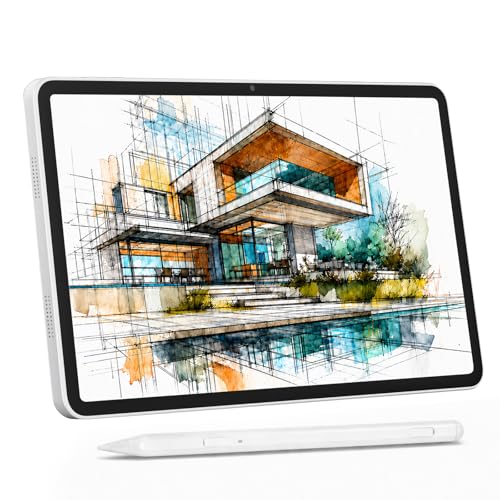
Callsky-Kids 12-Inch Blue Standalone Tablet
Best for: Beginners needing large, accurate standalone canvas
- Tablet Type
- Standalone
- Screen Size
- 12-inch
- Display Resolution
- 2000 x 1200
- Pen Pressure
- 4096 levels
- Color Gamut
- 100% sRGB
- Display Finish
- Full-lamination, anti-glare protector
This standalone drawing tablet features a 12-inch IPS display with 2000×1200 resolution and 100% sRGB color gamut. It runs Android 15 with 16GB RAM and 256GB storage. The stylus offers 4096 pressure levels and 60-degree tilt support. You get a full kit with a shockproof case and anti-glare protector. It suits beginners and students who need a portable, all-in-one creative device.
- 12-inch IPS screen with 2000×1200 resolution
- 16GB RAM and 256GB internal storage
- 4096-level stylus with 60-degree tilt support
- 100% sRGB color gamut for accurate colors
- 8000mAh battery with reverse charging capability
- Lower 2000×1200 resolution compared to 2.4K competitors
- Heavier 15.9-ounce build than smaller tablets
- Android 15 OS may limit some professional app features
- You want a large 12-inch canvas for detailed work
- You need a standalone device without a computer
- You prioritize color accuracy with 100% sRGB coverage
- You require 4K or higher display resolution
- You prefer a lighter, more portable device under 12 inches
- You need advanced professional software not available on Android
Verdict: Callsky-Kids 12-Inch Standalone Drawing Tablet fits beginners seeking a large, accurate display. It offers solid specs for students and hobbyists who value color fidelity and portability.
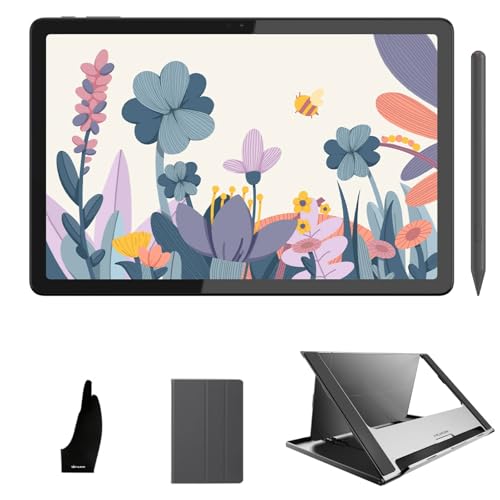
HUION Kamvas Slate 11 Standalone Tablet
Best for: portable artists needing a 90Hz display
- Tablet Type
- Standalone
- Screen Size
- 10.95 Inch
- Display Resolution
- FHD+ (1920*1200)
- Pen Pressure
- 4096 levels
- Color Gamut
- 99% sRGB
- Refresh Rate
- 90Hz
The HUION Kamvas Slate 11 is a standalone Android tablet with a 10.95-inch 90Hz FHD+ display. It features 128GB of storage and an anti-glare soft light glass screen for reduced eye strain. The included stylus offers 4096 pressure levels and tilt support. This device suits artists who want a portable, paper-like drawing experience without a computer. It fits easily in a backpack for on-the-go creativity.
- 10.95-inch 90Hz FHD+ display with 99% sRGB color gamut
- 128GB internal storage for apps and files
- Anti-glare soft light glass with paper-like texture
- 4096-level pressure sensitivity and 60-degree tilt recognition
- 10.95-inch screen is smaller than the 12.2-inch and 14.25-inch options on this list
- 128GB storage is less than the 256GB capacity found in some competitors
- You want a standalone tablet with a 90Hz refresh rate for smooth drawing
- You prefer an anti-glare screen for comfortable extended use
- You need a portable device that fits in a standard backpack
- You require a screen larger than 11 inches for detailed work
- You need more than 128GB of internal storage for large projects
- You prefer a higher resolution display than FHD+
Verdict: The HUION Kamvas Slate 11 10.95-inch is a compact standalone drawing tablet for artists who value portability and a smooth 90Hz display. It is a practical choice for those who need a lightweight device with ample storage for creative work on the go.
Specifications side by side
| Spec | XPPen 10.95" Android Drawing Tablet | Frunsi RubensTab T11 Pro 10.1-Inch | XPPen Magic Drawing Pad 12.2" 256GB | PicassoTab X11 11-Inch Drawing Tablet | UGEE UT3 14.25" 2.4K Standalone Tablet | Frunsi RubensTab T8 8-Inch Standalone Tablet | XP-Pen Magic Drawing Pad 12.2 Standalone | Simbans PicassoTab A10 10-Inch | HUION Kamvas Slate 11 Standalone Tablet | Wacom MovinkPad 11 Android Tablet | Callsky-Kids 12-Inch Blue Standalone Tablet | HUION Kamvas Slate 11 Standalone Tablet |
|---|---|---|---|---|---|---|---|---|---|---|---|---|
| Tablet Type | Standalone | Standalone | Standalone | Standalone | Standalone | Standalone | Standalone | Standalone | Standalone | – | Standalone | Standalone |
| Screen Size | 10.95-inch | 10.1 inch | 12.2-inch | 11-inch | 14.25 inches | 8" | 12.2" | 10" | 10.95-inch | 11.45" | 12-inch | 10.95 Inch |
| Display Resolution | – | 1920 x 1200 Full HD | 2160*1440 | Full HD | 2.4K | 1200×800 | 2160×1440 | – | FHD+ (1920*1200) | – | 2000 x 1200 | FHD+ (1920*1200) |
| Pen Pressure | 16384 | – | 16,384 levels | – | – | – | 16384 | 4096 Level | 4096 levels | 8192 | 4096 levels | 4096 levels |
| Color Gamut | – | – | 97% sRGB | – | – | – | 97% sRGB | – | 99% sRGB | – | 100% sRGB | 99% sRGB |
| Refresh Rate | 90Hz | – | – | – | – | – | – | – | 90Hz | – | – | 90Hz |
| Display Finish | AG nano-etching, anti-glare | – | AG-etched | Fully laminated, anti-glare | Paper-like NanoMatte | – | – | Paper-Like Laminated Screen | Full-Laminated Anti-Glare Screen | Matte etched glass | Full-lamination, anti-glare protector | Full-laminated, nano-etching glass |
| Shortcut Controls | – | – | – | – | U-Key | – | – | – | – | – | – | – |
| Storage | – | – | 256GB | – | 256GB | – | 256GB | 128GB | 128GB | 128GB | 256GB | 128GB |
| Operating System | Android | – | – | – | – | – | – | – | Android | Android | Android | Android |
| Use | Note-Taking | – | – | – | – | – | – | – | Note-Taking | – | – | – |
| Features | Tilt Support | Octa-Core | Stylus, Stylus Pen, Tilt Support | Stylus, Stylus Pen | – | Octa-Core | – | Stylus, Stylus Pen, Octa-Core | Stylus, Stylus Pen, Tilt Support | Stylus, Stylus Pen | Stylus, Stylus Pen | Stylus, Stylus Pen, Tilt Support |
| Display | Anti-Glare | – | – | – | 4K | – | – | – | Anti-Glare | Anti-Glare | Anti-Glare | Anti-Glare |
| Color | Silver White | Black | Purple | – | Black | Black | Black | – | – | Light Gray | Blue | – |
| Audience | – | Students, Beginners | – | – | – | Students, Beginners | – | Beginners | – | – | Students, Beginners | – |
| Weight | 3.55 pounds | – | 1.3 pounds | 3.7 pounds | 3.92 pounds | – | 1.3 pounds | 3.31 pounds | 1.12 pounds | 1.3 pounds | 15.9 ounces | – |
| Dimensions | – | 7.87 × 6.69 × 0.39 inches | – | – | – | – | – | – | 10.1 × 6.63 × 0.1 inches | – | 9.48 × 6.31 × 0.34 inches | – |
| Length | – | – | 11.4 inches | – | 14.3 inches | – | – | 14.2 inches | – | 10.5 inches | – | – |
| Width | – | – | 7.48 inches | – | 10.9 inches | – | – | 8.66 inches | – | 7.17 inches | – | – |
| Size | 7.17 x 10.16 x 0.28 inches | 10 inch | 279 x 192 x 6.9 mm | 10.95 Inch Screen | UT3 | 8 inch | 12.2 inch | 10 Inch Compact Screen | 11 Inch | 11 inch | 12-Inch | – |
| Model | 52e86482-279f-4728-80b7-089e325299ba | RubensTab | Magic Drawing Pad | X11 | 2fc69a16-6cca-4244-88eb-48eef704e039 | RubensTab T8 | X3 Pro | A10 | KT1101 | MovinkPad 11 Android All-in-One | Ctab12-Pro | KT1101 |
If you prefer E Ink hardware for sketching, you can compare specifications across the best BOOX tablets.
How to choose the right one
Check Screen Resolution
Screen resolution determines how sharp your digital canvas appears. Higher pixel density allows for finer details in complex illustrations. The UGEE UT3 offers a 4K display, providing exceptional clarity for large-scale professional work. Most other models, such as the Frunsi RubensTab T11 Pro, use Full HD screens which remain sharp for general sketching. You should match the resolution to your need for detail. A higher resolution helps when zooming in on intricate line art. It also improves the viewing experience for color grading and shading. Consider your typical zoom level when selecting this spec.
Evaluate Storage Capacity
Storage space holds your apps, drawings, and system files. Models with 256GB, like the XPPen Magic Drawing Pad 12.2, offer ample room for extensive libraries. This is vital for artists who save many high-resolution files locally. Devices with 128GB, such as the HUION Kamvas Slate 11, are sufficient for moderate users. You must consider how many projects you store simultaneously. If you rely on cloud backups, less local storage may suffice. Always check the internal capacity to ensure it meets your workflow demands without frequent cleanup.
Assess Pen Pressure
Pen pressure sensitivity defines how naturally your strokes respond to hand force. A 16K level, found on the XPPen 10.95" model, allows for subtle variations in line weight. This creates more organic-looking drawings compared to lower sensitivity settings. It helps mimic traditional ink or pencil pressure. You should look for this spec if you create detailed illustrations. It affects the realism of your shading and line work. Higher levels provide finer control. This feature is essential for professional digital artists who need precise output.
Review Display Coating
The display coating affects glare and texture. An anti-glare or matte finish reduces reflections from overhead lights. This is crucial for working in bright environments or near windows. The XPPen 10.95" and Wacom MovinkPad 11 both feature anti-glare screens. This coating also provides slight friction, mimicking the feel of paper. It helps with control when drawing. You should prioritize this if you work in varied lighting. A glossy screen might look vibrant but can cause eye strain and reflections. Matte displays offer better visibility during long sessions.
Consider Operating System
The operating system determines app availability and multitasking. Android-based tablets, like the XPPen 10.95", offer access to a wide app store. You can download specialized drawing apps directly on the device. This makes them truly standalone without needing a computer. You should verify the OS if you want flexibility. It allows you to update apps and manage files easily. Some models may have limited software options. Ensure the system supports the specific applications you need for your creative workflow.
Frequently asked questions
Do standalone drawing tablets support tilt recognition?
Yes, several models in this list include tilt support to enhance shading and line variation. The XPPen 10.95" Android Drawing Tablet and the XPPen Magic Drawing Pad 12.2 both feature this capability. The HUION Kamvas Slate 11 also offers tilt support for more natural brush strokes. This feature allows you to simulate traditional pencil angles.
What is the smallest screen size available on these tablets?
The Frunsi RubensTab T8 offers the most compact display at 8 inches. It is designed for beginners and students who prioritize portability over screen real estate. This size makes it easy to carry in a small bag while still providing a functional canvas for sketching and note-taking on the go.
Which tablet has the highest screen resolution?
The UGEE UT3 14.25" provides a 4K display, offering the highest resolution in this group. This clarity is ideal for large canvas digital art where fine details matter. While other models like the XPPen Magic Drawing Pad 12.2 offer high resolution, the 4K panel on the UGEE ensures exceptional sharpness for professional work.
How much storage do these standalone tablets typically offer?
Storage capacity varies, with many models offering 128GB or 256GB. The XPPen Magic Drawing Pad 12.2, UGEE UT3, and Callsky-Kids 12-Inch all provide 256GB for ample space. The Simbans PicassoTab A10 and HUION Kamvas Slate 11 include 128GB. This allows you to store numerous apps and high-resolution files without needing external drives.
Are these tablets suitable for beginners?
Yes, several models are specifically recommended for beginners and students. The Frunsi RubensTab T8 and T11 Pro are noted as solid choices for newcomers. The Simbans PicassoTab A10 includes guided learning resources to help new artists. These devices balance portability and ease of use, making them practical starting points for digital art.
Do these devices have anti-glare displays?
Many of the listed tablets feature anti-glare or matte displays to reduce reflections. The XPPen 10.95" Android Drawing Tablet and the Wacom MovinkPad 11 both include this feature. The HUION Kamvas Slate 11 also offers a matte display for comfortable, precise work. This coating helps maintain color accuracy and reduces eye strain during long sessions.
What is the lightest tablet in this list?
The HUION Kamvas Slate 11 is the lightest option at just 1.12 pounds. Its slim profile and low weight make it highly portable for artists working away from a desk. The Callsky-Kids 12-Inch is also very light at 15.9 ounces. These weights ensure comfortable handling during extended drawing periods.


