Best Wacom Drawing Tablets Under $500: 3 Spec-Based Picks
Finding the best wacom drawing tablets under $500 requires looking at the numbers.

What this report covers
- Last updated
- 4 Nov 2026
Figures above are read from the product listings for the models named below. Scores are out of 10, based on listed specifications and buyer feedback.
As Amazon Associates, we earn from qualifying purchases. This means we may receive a small commission at no extra cost to you if you click through and make a purchase.
As an Amazon Associate we earn from qualifying purchases. Links on this page are affiliate links.
Finding the best wacom drawing tablets under $500 requires looking at the numbers. We compared 3 models based on their published specifications. The top pick is the Wacom Cintiq 13HD 13.3-Inch Pen Display, which leads because it offers a dedicated 13-inch screen for direct drawing. This guide helps you decide which device fits your workspace, whether you need a compact pen display or a larger standalone tablet.
Match your workspace to the tablet type
You must choose between a pen display or a standalone tablet. The Cintiq 13HD requires a computer and offers a 13-inch screen for direct drawing. The MovinkPad 11 runs Android with 128GB storage for portable sketching. Select the form that fits your desk or travel needs.
| # | Product | Best for | Price |
|---|---|---|---|
| 1 | Wacom Cintiq 13HD 13.3-Inch Pen Display Best overall | Desktop artists needing a compact pen display | |
| 2 | Wacom Intuos Pro Large Bluetooth Tablet Best budget | Professional animators needing large drawing space | |
| 3 | Wacom MovinkPad 11 Android Tablet Best 128gb | portable standalone Android drawing |
The best fit for you
- You want the most compact pen display – Wacom Cintiq 13HD 13.3-Inch Pen Display – Its 13-inch screen and 2.64-pound weight suit tight desktop spaces.
- You need a large area for animation work – Wacom Intuos Pro Large Bluetooth Tablet – The large active area and Bluetooth connectivity support detailed professional tasks.
- You prefer a standalone Android device for sketching – Wacom MovinkPad 11 Android Tablet – Its 128GB storage and 11-inch Android screen allow portable, desk-free use.

Wacom Cintiq 13HD 13.3-Inch Pen Display
Best for: Desktop artists needing a compact pen display
- Screen Size
- 13.3"
- Display Resolution
- 1920 X 1080
- Pen Pressure
- 2048 levels
- Shortcut Controls
- four ExpressKeys, Rocker ring
- Features
- Stylus, Stylus Pen
- Color
- Black
The Wacom Cintiq 13HD is a 13-inch interactive pen display with a 1920 x 1080 resolution. It features a 2048-level pressure-sensitive Pro Pen and tilt detection for natural drawing. The device weighs 2.64 pounds and includes four customizable ExpressKeys. This compact screen suits artists who want direct on-screen input without the bulk of larger professional models.
- 13.3-inch HD display with 1920 x 1080 resolution
- 2048 levels of pressure sensitivity and tilt support
- Four customizable ExpressKeys and a Rocker ring
- Compact 2.64-pound design with a 3-position stand
- 13-inch screen is smaller than the 11-inch MovinkPad's larger canvas area
- 2048 pressure levels are fewer than the 8192 levels found in the Intuos Pro
- 2.64-pound weight is heavier than the mobile MovinkPad tablet
- You need a dedicated screen for direct drawing input
- You prefer a compact 13-inch workspace
- You want customizable shortcut keys for your workflow
- You require a mobile Android tablet for drawing on the go
- You need the highest pressure sensitivity levels available
- You want a larger display area than 13 inches
Verdict: Wacom Cintiq 13HD Pen Display fits artists who want a dedicated, compact screen for direct drawing. It offers solid pressure sensitivity and a manageable footprint for desktop setups.
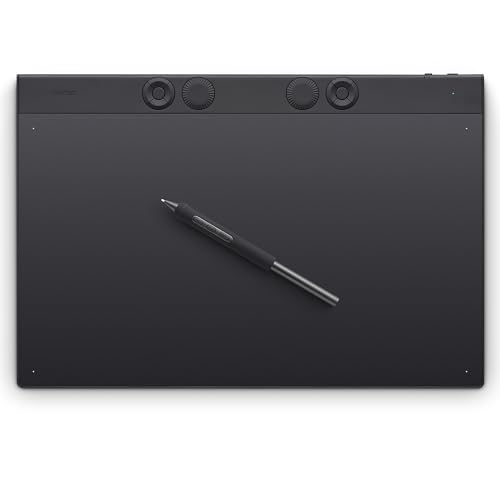
Wacom Intuos Pro Large Bluetooth Tablet
Best for: Professional animators needing large drawing space
- Pen Pressure
- 8192
- Shortcut Controls
- 10 ExpressKeys, 2 mechanical dials
- Features
- Stylus, Stylus Pen, Bluetooth, Shortcut Keys
- Color
- Black
- Tablet Type
- Pen Tablet
- Audience
- Animation
The Wacom Intuos Pro Large is a professional-grade pen tablet with a 14.8 x 9.9-inch active area. It uses the Pro Pen 3, which provides 8192 pressure levels and tilt support for precise strokes. The device connects via Bluetooth or USB and includes two mechanical dials and ten customizable ExpressKeys. This large-format tablet suits animators and designers who need a spacious drawing surface and premium build quality.
- Pro Pen 3 offers 8192 pressure levels and tilt support
- Large 14.8 x 9.9-inch active area with 16:9 format
- Two mechanical dials and ten customizable ExpressKeys
- Bluetooth wireless connectivity or USB wired connection
- Heavier at 1.46 pounds compared to smaller models
- Large physical footprint requires more desk space
- You need a large drawing surface for detailed work
- You prefer physical dials and shortcut keys for efficiency
- You want a sturdy magnesium build for daily use
- You prioritize a lightweight and portable device
- You need a built-in display screen
- You have limited desk space available
Verdict: Wacom Intuos Pro Large delivers professional precision with its large active area and Pro Pen 3. It is the right choice for animators and designers who value a spacious, sturdy tablet with customizable controls.

Wacom MovinkPad 11 Android Tablet
Best for: portable standalone Android drawing
- Screen Size
- 11.45"
- Pen Pressure
- 8192
- Display Finish
- Matte etched glass
- Storage
- 128GB
- Operating System
- Android
- Features
- Stylus, Stylus Pen
The Wacom MovinkPad 11 is an 11-inch standalone Android tablet designed for drawing without a computer. It features 8GB of RAM and 128GB of storage for local file management. The device includes a Pro Pen 3 with 8,192 pressure levels and a matte etched glass display. Weighing 1.3 pounds, it offers a portable, all-in-one solution for sketching on the go.
- 11.45-inch Android 14 display with matte etched glass surface
- 8GB RAM and 128GB internal storage for standalone use
- Pro Pen 3 delivers 8,192 pressure levels with three buttons
- Lightweight 1.3-pound build fits easily in a backpack
- Smaller 11-inch screen compared to larger desktop alternatives
- Limited to 128GB storage capacity for local assets
- Android operating system restricts professional desktop software access
- You want a standalone tablet that does not require a computer
- You prioritize portability with a device under 1.5 pounds
- You need 128GB of local storage for your artwork files
- You require a large 13-inch or larger display for detailed work
- You need to run full Windows or macOS creative applications
- You prefer a traditional pen display connected to a desktop
Verdict: Wacom MovinkPad 11 Android Tablet is the ideal pick for artists seeking a lightweight, standalone Android device for sketching away from a desk. It suits those who value portability and built-in storage over desktop software compatibility.
Specifications side by side
| Spec | Wacom Cintiq 13HD 13.3-Inch Pen Display | Wacom Intuos Pro Large Bluetooth Tablet | Wacom MovinkPad 11 Android Tablet |
|---|---|---|---|
| Screen Size | 13.3" | – | 11.45" |
| Display Resolution | 1920 X 1080 | – | – |
| Pen Pressure | 2048 levels | 8192 | 8192 |
| Display Finish | – | – | Matte etched glass |
| Shortcut Controls | four ExpressKeys, Rocker ring | 10 ExpressKeys, 2 mechanical dials | – |
| Storage | – | – | 128GB |
| Operating System | – | – | Android |
| Features | Stylus, Stylus Pen | Stylus, Stylus Pen, Bluetooth, Shortcut Keys | Stylus, Stylus Pen |
| Display | – | – | Anti-Glare |
| Color | Black | Black | Light Gray |
| Tablet Type | Pen Display | Pen Tablet | Standalone |
| Audience | – | Animation | – |
| Dimensions | 14.8 × 0.53 × 9.76 inches | – | – |
| Weight | 2.64 pounds | 1.46 pounds | 1.3 pounds |
| Length | – | 14.8 inches | 10.5 inches |
| Width | – | 9.96 inches | 7.17 inches |
| Size | 13" | Large | 11 inch |
| Model | DTK1300 | PTK870K0A | MovinkPad 11 Android All-in-One |
Key Specs for Choosing Your Tablet
Check Screen Dimensions
Screen size determines your drawing area and desk footprint. The Cintiq 13HD offers a 13-inch display with a 14.8-inch length. This compact form fits tight desktops. Larger active areas allow more natural arm movements. Measure your workspace before buying. A smaller tablet saves space but limits large strokes. Choose a size that matches your typical canvas needs. Ensure your desk has enough room for the device.
Evaluate Storage Capacity
Storage matters if you need a standalone device. The MovinkPad 11 includes 128GB of internal storage. This allows you to save sketches without a computer. Pen displays like the Cintiq 13HD rely on external computers for storage. Standalone tablets let you draw anywhere. Check if you need local file saving. If you always use a PC, external storage is fine. For portability, ensure sufficient built-in gigabytes for your library.
Consider Connectivity Options
Connectivity defines how the tablet talks to your tools. The Intuos Pro Large features Bluetooth for wireless linking. This reduces cable clutter on your desk. Other models may require wired connections. Wireless options offer freedom of movement. Wired connections often provide more stable data transfer. Decide if you prefer untethered drawing or maximum reliability. Check the supported connection types for your setup requirements.
Review Operating Systems
The operating system dictates your software environment. The MovinkPad 11 runs Android for standalone use. You access Android apps directly on the device. Other tablets are pen displays or standard tablets requiring a host. Android offers mobile app compatibility. Desktop displays require a connected computer. Choose based on whether you want a self-contained system. Your workflow depends heavily on this software foundation.
Assess Physical Weight
Weight affects portability and desk stability. The MovinkPad 11 weighs 1.3 pounds for easy carrying. The Cintiq 13HD is heavier at 2.64 pounds. Heavier devices stay put on a desk. Lighter units are easier to transport. Consider how often you move your gear. A heavy pen display is best for fixed stations. A light standalone tablet suits mobile artists. Match the weight to your mobility needs.
Frequently asked questions
Does the Wacom Cintiq 13HD include a stylus?
Yes, the Cintiq 13HD comes with a stylus and stylus pen. This allows for direct drawing on the 13-inch screen. The included pen provides the pressure sensitivity needed for detailed digital art. You do not need to purchase a separate input device to start creating on this pen display.
Can the Wacom Intuos Pro connect via Bluetooth?
Yes, the Intuos Pro Large features Bluetooth connectivity. This wireless option reduces cable clutter on your desk. It also includes shortcut keys for efficient workflow. The large active area and Pro Pen 3 support precise professional tasks without the need for wired connections.
Is the Wacom MovinkPad 11 a standalone tablet?
Yes, the MovinkPad 11 is a standalone Android tablet. It runs Android with 128GB of storage for portable sketching. You can use it away from a desktop computer. Its lightweight design and anti-glare display make it suitable for drawing on the go without external hardware.
Which Wacom tablet is best for animation work?
The Intuos Pro Large is best for professional animators. It offers a large active area for detailed work. The spacious surface supports natural arm movements. Combined with Bluetooth and shortcut keys, it provides the precision and control needed for complex animation projects and design tasks.
How heavy is the Wacom Cintiq 13HD?
The Cintiq 13HD weighs 2.64 pounds. Its dimensions are 14.8 inches in length and 9.76 inches in height. This compact footprint fits well on tight desktops. The manageable weight makes it easy to position on your workspace while maintaining stability during drawing sessions.
What storage capacity does the MovinkPad 11 have?
The MovinkPad 11 includes 128GB of storage. This built-in capacity allows you to save projects directly on the device. It supports standalone Android drawing without needing external drives. The ample space is ideal for artists who value portability and built-in storage for their digital files.
Does the Intuos Pro Large have shortcut keys?
Yes, the Intuos Pro Large includes shortcut keys. These customizable controls help streamline your creative process. You can assign functions to keys for faster access to tools. This feature, combined with its large size, makes it a practical choice for professional designers and animators.


