Best XP-Pen Drawing Tablets with Anti-Glare: 4 Spec-Based Picks
Finding the best XP-Pen drawing tablets with anti glare requires checking the specs that matter for your workflow.

What this report covers
- Last updated
- 4 Nov 2026
Figures above are read from the product listings for the models named below. Scores are out of 10, based on listed specifications and buyer feedback.
As Amazon Associates, we earn from qualifying purchases. This means we may receive a small commission at no extra cost to you if you click through and make a purchase.
As an Amazon Associate we earn from qualifying purchases. Links on this page are affiliate links.
Finding the best XP-Pen drawing tablets with anti glare requires checking the specs that matter for your workflow. We compared 4 models based on the specifications published on the listings. The XPPen 10.95" Android Drawing Tablet leads because it offers portable standalone sketching with anti-glare features. This makes it ideal for artists who want to draw without a computer. The other picks focus on high-resolution displays and tactile controls for different needs. This guide helps you decide which device fits your specific creative requirements.
Choose standalone or pen display
Decide if you need a standalone Android tablet or a pen display for your computer. The top pick is a portable 10.95-inch standalone unit with anti-glare. The budget option is a 18.4-inch 4K pen display. Both offer 16K pen pressure levels. Your choice depends on whether you prioritize portability or a larger, high-resolution screen for detailed work.
| # | Product | Best for | Price |
|---|---|---|---|
| 1 | XPPen 10.95" Android Drawing Tablet Best overall | portable standalone sketching with anti-glare | |
| 2 | XPPen Artist Pro 19 Gen2 18.4-Inch 4K Best budget | High-resolution 4K digital illustration and design | |
| 3 | XP-Pen Artist 12 11.9" Drawing Tablet Best black | artists wanting dial controls and anti-glare | |
| 4 | XPPen Artist 16 3rd 15.4" Anti-Glare Pen Display Also great | Illustrators needing large anti-glare screens |
The best fit for you
- You need a standalone tablet for portable sketching – XPPen 10.95" Android Drawing Tablet – This Android device offers 16K pressure levels and an anti-glare screen for drawing without a computer.
- You want high-resolution 4K clarity for detailed illustration – XPPen Artist Pro 19 Gen2 18.4-Inch 4K – The 18.4-inch display provides 4K resolution and 16K pressure sensitivity for precise digital art creation.
- You prefer tactile dial controls for animation work – XP-Pen Artist 12 11.9" Drawing Tablet – This model includes a physical dial and shortcut keys alongside an anti-glare screen for beginners.
- You require a large screen for professional illustration – XPPen Artist 16 3rd 15.4" Anti-Glare Pen Display – The 15.4-inch anti-glare display provides ample space for detailed work while maintaining 16K pressure sensitivity.

XPPen 10.95" Android Drawing Tablet
Best for: portable standalone sketching with anti-glare
- Display
- Anti-Glare
- Tablet Type
- Standalone
- Screen Size
- 10.95-inch
- Pen Pressure
- 16384
- Refresh Rate
- 90Hz
- Display Finish
- AG nano-etching, anti-glare
This XP-Pen standalone tablet features a 10.95-inch display with anti-glare nano-etching for a paper-like feel. It runs Android 14 and includes a 90Hz refresh rate for smooth line transitions. The 16K pressure levels and tilt support allow for precise sketching. Weighing 3.55 pounds, it is portable but heavier than screen-based peers. It suits artists who want a self-contained device without a computer.
- 10.95-inch anti-glare X-Paper display
- 90Hz refresh rate reduces lag
- 16K pressure levels with tilt support
- Runs Android 14 with Google Play
- Heavier at 3.55 pounds compared to lighter competitors
- Smaller 10.95-inch screen versus 11.9-inch and 15.4-inch models on the list
- You want a standalone device without a PC
- You prefer an anti-glare screen for sketching
- You need Android apps for note-taking
- You require a larger display area
- You need a lighter, more portable build
- You prefer a pen display connected to a computer
Verdict: XP-Pen 10.95" Standalone Anti-Glare Tablet is a solid standalone option for artists who value portability and a paper-like texture. It fits users who want to sketch without a computer and do not mind a heavier device.

XPPen Artist Pro 19 Gen2 18.4-Inch 4K
Best for: High-resolution 4K digital illustration and design
- Display
- Anti-Glare
- Tablet Type
- Tethered pen display
- Screen Size
- 18.4 inches
- Display Resolution
- 3840×2160 4K UHD
- Pen Pressure
- 16,384 levels
- Color Gamut
- 99.8% sRGB, 96% Adobe RGB, 98% P3
The XP-Pen Artist Pro 19 Gen2 is an 18.4-inch pen display featuring a 4K UHD anti-glare screen. It covers 99.8% sRGB and 98% Display P3 with Calman-verified accuracy. The device includes dual styluses with 16,384 pressure levels and a wireless shortcut keyboard. It suits artists needing high resolution and color fidelity for professional work across multiple operating systems.
- 4K UHD (3840×2160) resolution for detailed editing
- Anti-glare etched glass with paper-like texture
- Covers 99.8% sRGB, 96% Adobe RGB, and 98% Display P3
- Includes dual styluses: Slim and Roller types
- Calman verified with △E < 1.5 color accuracy
- 18.4-inch screen is smaller than the 21.5-inch and 22-inch options available
- 16K pen pressure levels are fewer than the 16K (X4) stylus on the Artist 12 3rd
- 156% sRGB rating is lower than the full 100%+ coverage claims on competitors
- You need a 4K display for high-detail vector or raster art
- You prefer an anti-glare screen for working in bright environments
- You want dual stylus options for different drawing techniques
- You require a screen larger than 18.4 inches
- You need a standalone tablet without a computer connection
- You prefer a smaller 12-inch or 16-inch portable format
Verdict: The XP-Pen Artist Pro 19 Gen2 18.4-inch delivers professional-grade color accuracy and 4K clarity for detailed digital art. It fits illustrators and designers who prioritize screen resolution and anti-glare performance over maximum physical size.

XP-Pen Artist 12 11.9" Drawing Tablet
Best for: artists wanting dial controls and anti-glare
- Display
- Anti-Glare
- Tablet Type
- Tethered pen display
- Screen Size
- 11.9 inch
- Display Resolution
- 1920×1080 Full HD
- Pen Pressure
- 16,384 levels
- Color Gamut
- 99% sRGB
The XP-Pen Artist 12 3rd is an 11.9-inch pen display with an anti-glare etched glass screen. It features 16K pressure levels, 99% sRGB color coverage, and dual X-Dial wheels for quick adjustments. Weighing 2.48 pounds, it offers a portable setup with a foldable stand. This model suits artists who value tactile controls and reduced screen glare for detailed work.
- 11.9-inch anti-glare etched glass display reduces 85% glare
- 16,384 pressure levels with 60-degree tilt support
- Dual X-Dial wheels for instant brush size and zoom control
- 99% sRGB color accuracy with factory calibration
- Heavier at 2.48 pounds compared to the 1.58 lb portable model
- Smaller 11.9-inch screen compared to 15.4-inch and 19-inch options
- Standard 1080p resolution rather than 4K UHD
- You prefer physical dial wheels for adjusting tools
- You want an anti-glare screen to reduce eye strain
- You need a compact pen display for travel
- You require a 4K UHD display for maximum detail
- You need a screen larger than 12 inches
- You prioritize the lightest possible portable weight
Verdict: XP-Pen Artist 12 3rd 11.9" Black is a solid mid-size choice for artists who want tactile dial controls and an anti-glare screen without the bulk of larger models.
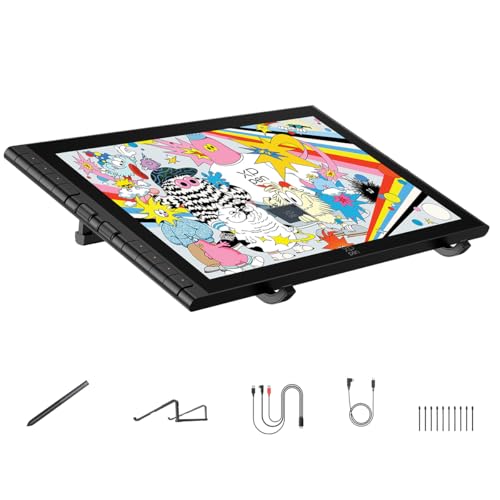
XPPen Artist 16 3rd 15.4" Anti-Glare Pen Display
Best for: Illustrators needing large anti-glare screens
- Display
- Anti-Glare
- Tablet Type
- Pen display
- Screen Size
- 15.4"
- Display Resolution
- FHD
- Pen Pressure
- 16,384 levels
- Color Gamut
- 99% sRGB, 98% Adobe RGB, 97% P3
The XP-Pen Artist 16 3rd is a 15.4-inch pen display with an anti-glare etched glass screen. It features 16K pressure sensitivity and covers 99% sRGB color space. The device includes dual scroll wheels and eight shortcut keys for workflow efficiency. It weighs 2.99 pounds and supports multiple operating systems. This tablet suits artists who need broad color accuracy and a large drawing area with reduced glare.
- 15.4-inch FHD display with anti-glare etched glass
- 16,384 levels of pressure sensitivity with X4 smart chip
- 99% sRGB and 98% Adobe RGB color gamut coverage
- Built-in OSD for color space management
- Dual independent scroll wheels and eight shortcut keys
- Heavier at 2.99 pounds compared to lighter competitors
- Smaller 15.4-inch screen size versus the 19-inch model
- Lower color gamut coverage than the 4K UHD 19 Gen2
- You want a large 15.4-inch anti-glare drawing surface
- You need high color accuracy for professional illustration
- You prefer physical scroll wheels for workflow control
- You require a standalone device without a computer
- You need the highest possible color gamut coverage
- You prefer a lighter and more portable build
Verdict: The XP-Pen Artist 16 3rd 15.4" Anti-Glare offers a balanced mix of color accuracy and physical controls. It fits illustrators who prioritize screen real estate and tactile feedback over portability.
Specifications side by side
| Spec | XPPen 10.95" Android Drawing Tablet | XPPen Artist Pro 19 Gen2 18.4-Inch 4K | XP-Pen Artist 12 11.9" Drawing Tablet | XPPen Artist 16 3rd 15.4" Anti-Glare Pen Display |
|---|---|---|---|---|
| Tablet Type | Standalone | Tethered pen display | Tethered pen display | Pen display |
| Screen Size | 10.95-inch | 18.4 inches | 11.9 inch | 15.4" |
| Display Resolution | – | 3840×2160 4K UHD | 1920×1080 Full HD | FHD |
| Pen Pressure | 16384 | 16,384 levels | 16,384 levels | 16,384 levels |
| Color Gamut | – | 99.8% sRGB, 96% Adobe RGB, 98% P3 | 99% sRGB | 99% sRGB, 98% Adobe RGB, 97% P3 |
| Refresh Rate | 90Hz | – | – | – |
| Display Finish | AG nano-etching, anti-glare | Full-laminated, AG etched glass | Full lamination, AG etched glass | Fully laminated, AG+AF etched glass |
| Shortcut Controls | – | Wireless remote (10 keys, dial) | Dual X-Dial wheels, 8 keys | 8 shortcut keys, 2 scroll wheels |
| Operating System | Android | – | Android | Android |
| Use | Note-Taking | – | – | – |
| Features | Tilt Support | Stylus, Stylus Pen, Shortcut Keys, Dial | Stylus, Stylus Pen, Shortcut Keys, Dial | Stylus, Stylus Pen |
| Display | Anti-Glare | Anti-Glare | Anti-Glare | Anti-Glare |
| Color | Silver White | Dark Silver | Black | black 15.4inch |
| Audience | – | – | Animation, Beginners | – |
| Weight | 3.55 pounds | – | 2.48 pounds | 2.99 pounds |
| Dimensions | – | 19 × 14 × 0.1 inches | – | – |
| Length | – | – | 14.4 inches | 16.1 inches |
| Width | – | – | 9.17 inches | 9.17 inches |
| Size | 7.17 x 10.16 x 0.28 inches | 18.4 Inch | 11.9 inch | 15.4 inch |
| Model | 52e86482-279f-4728-80b7-089e325299ba | Artist Pro 19 Gen2 | Artist 12 3rd | XPPen Artist 16 3rd |
Choosing the Right XP-Pen Tablet
Check Operating System Needs
Decide if you need a standalone device or a computer peripheral. The XPPen 10.95" Android Drawing Tablet runs Android, allowing you to sketch without a PC. This standalone option suits artists who value portability and want to work on the go. Other models in this guide function as pen displays, requiring a connected computer to operate. Choose based on your workflow preference. If you need mobility, the standalone Android unit is the clear choice. If you rely on desktop software, a pen display is more appropriate.
Evaluate Screen Size
Screen size impacts both workspace and portability. The XPPen 10.95" Android Drawing Tablet measures 7.17 x 10.16 inches, making it compact and easy to carry. In contrast, the XPPen Artist Pro 19 Gen2 offers an 18.4-inch display, providing ample space for detailed illustration. The XP-Pen Artist 12 sits in the middle at 11.9 inches. Larger screens offer more room for complex projects but reduce mobility. Select a size that fits your desk space and travel habits. Consider the physical dimensions listed in the specs to ensure it fits your current setup.
Consider Tilt Support
Tilt support allows your stylus to change stroke width based on angle, mimicking real drawing tools. The XPPen 10.95" Android Drawing Tablet includes tilt support, enhancing the natural feel of your sketches. This feature is valuable for artists who want varied line weights without changing tools. Check the attributes section to confirm if a specific model supports this function. Not all pen displays offer the same level of tilt responsiveness. If natural shading is important to your art style, prioritize tablets that explicitly list tilt support in their specifications.
Look for Physical Controls
Physical controls like dials and shortcut keys improve workflow efficiency. The XP-Pen Artist 12 and the XPPen Artist Pro 19 Gen2 both feature dial controls and shortcut keys. These tactile inputs allow you to adjust settings without moving your hand from the drawing area. The XPPen 10.95" Android Drawing Tablet does not list these physical controls. If you frequently adjust brush size or opacity, physical dials are highly beneficial. Choose a model with controls that match your preferred interaction style for a smoother creative process.
Assess Weight for Portability
Weight affects how comfortable a tablet is to hold or carry. The XPPen 10.95" Android Drawing Tablet weighs 3.55 pounds, which is manageable for portable use. The XP-Pen Artist 12 is lighter at 2.48 pounds, while the XPPen Artist 16 weighs 2.99 pounds. Heavier devices may cause fatigue during long drawing sessions if held. For desk-bound use, weight is less critical. Compare the listed weight to determine which device fits your comfort needs. Lighter models are better for travel, while heavier units often offer larger screens.
Frequently asked questions
Which XP-Pen drawing tablet is best for portable standalone sketching?
The XPPen 10.95" Android Drawing Tablet is the top choice for portable use. It operates on Android, allowing you to draw without a computer. The device features an anti-glare screen and 16K pen pressure levels. It weighs 3.55 pounds and measures 7.17 by 10.16 inches. This makes it a solid option for artists who value portability.
What is the best budget XP-Pen tablet with an anti-glare display?
The XPPen Artist Pro 19 Gen2 is the best budget option. It features a large 18.4-inch 4K display for high-resolution illustration. The pen display includes a dial and shortcut keys for efficient workflow. It offers 16K pressure sensitivity and an anti-glare surface. This model suits illustrators who prioritize screen resolution and color accuracy.
Does the XP-Pen Artist 12 have an anti-glare screen?
Yes, the XP-Pen Artist 12 11.9" Drawing Tablet has an anti-glare display. It runs on Android and includes tactile dial controls. The device supports 16K pen pressure levels for precise drawing. It weighs 2.48 pounds and measures 9.17 by 14.4 inches. This mid-size pen display is ideal for artists who want physical controls without bulk.
Which XP-Pen tablet offers the largest anti-glare screen?
The XPPen Artist Pro 19 Gen2 offers the largest screen at 18.4 inches. It provides 4K clarity and an anti-glare finish for detailed work. The tablet type is a pen display with 16K pressure sensitivity. It includes a dial and shortcut keys. This model fits users who need maximum screen real estate for digital art and design.
Is the XPPen Artist 16 3rd a standalone tablet?
Yes, the XPPen Artist 16 3rd runs on Android, making it a standalone device. It features a 15.4-inch anti-glare screen for drawing without a computer. The tablet supports 16K pen pressure levels. It weighs 2.99 pounds and measures 9.17 by 16.1 inches. This model balances color accuracy with physical size for illustrators.
What pen pressure levels do these XP-Pen tablets support?
All listed XP-Pen drawing tablets support 16K pen pressure levels. This specification ensures precise line variation and detailed shading in your artwork. The XPPen 10.95", Artist Pro 19 Gen2, Artist 12, and Artist 16 3rd all share this feature. High pressure sensitivity allows for natural drawing responses across all models.
Do any of these XP-Pen tablets include a dial control?
The XPPen Artist Pro 19 Gen2 and the XP-Pen Artist 12 include dial controls. These physical dials provide tactile feedback for adjusting brush size or zoom. The Artist Pro 19 Gen2 also features shortcut keys. The standalone XPPen 10.95" and the Artist 16 3rd do not list dial controls in their specifications.
Which XP-Pen tablet is heaviest among the anti-glare options?
The XPPen 10.95" Android Drawing Tablet is the heaviest at 3.55 pounds. The XPPen Artist 16 3rd weighs 2.99 pounds. The XP-Pen Artist 12 is lighter at 2.48 pounds. The Artist Pro 19 Gen2 dimensions are listed but weight is not specified. Weight varies based on whether the device is a standalone unit or a pen display.


