Best XP-Pen Drawing Tablets: 15 Models Compared
XP-Pen makes a wide range of best XP-Pen drawing tablets, including standalone Android pads and pen displays for desktops.

What this report covers
- Last updated
- 13 Nov 2026
Figures above are read from the product listings for the models named below. Scores are out of 10, based on listed specifications and buyer feedback.
As Amazon Associates, we earn from qualifying purchases. This means we may receive a small commission at no extra cost to you if you click through and make a purchase.
As an Amazon Associate we earn from qualifying purchases. Links on this page are affiliate links.
XP-Pen makes a wide range of best XP-Pen drawing tablets, including standalone Android pads and pen displays for desktops. The lineup spans sizes from 10.95 inches to 23.8 inches, with options for wireless use or direct computer connection. We compared 15 models based strictly on published specifications. The XPPen 10.95" Android Drawing Tablet takes the top spot for portable standalone sketching and note-taking. Its compact form and paper-like friction suit artists who value mobility over large screen real estate.
| # | Product | Best for | Price |
|---|---|---|---|
| 1 | XPPen 10.95" Android Drawing Tablet Best overall | portable standalone sketching and note-taking | |
| 2 | XP-PEN Artist12 11.6-Inch Pen Display Also great | compact portable drawing and sketching | |
| 3 | XP-Pen Artist 15.6 Pro Drawing Tablet Also great | artists needing a large, color-accurate pen display | |
| 4 | XP-Pen Artist 22 2nd 21.5-Inch Display Best 21.5-inch | large canvas desktop illustration and design | |
| 5 | XPPen Artist Pro 14 Gen2 14-Inch Pen Display Also great | artists needing a compact, accurate pen display | |
| 6 | XPPen Deco Pro LW 11-Inch Wireless Tablet Best budget | wireless desktop drawing with a large workspace | |
| 7 | XPPen Magic Drawing Pad 12.2" 256GB Best purple | portable standalone drawing on the go | |
| 8 | XPPen Artist Pro 24 Gen2 23.8-inch Best premium | Large desktop animation and color-critical design | |
| 9 | XP-Pen Artist 13.3 Pro V2 Also great | Beginners needing a compact pen display with controls | |
| 10 | XP-Pen Magic Drawing Pad 12.2 Standalone Also great | portable standalone digital art on the go | |
| 11 | XP-Pen Artist 13.3 Pro V2 Also great | Compact desktop drawing with high color accuracy | |
| 12 | XP-Pen Artist Ultra 16 15.6" Touchscreen Best touchscreen | color-accurate illustration and touch-enabled workflows | |
| 13 | XP-Pen Artist 12 11.9" Drawing Tablet Also great | Portable drawing with dial controls | |
| 14 | XP-Pen Artist 12 Pro Lite 11.6-Inch Also great | portable sketching and direct computer connection | |
| 15 | XP-Pen Artist24 FHD 23.8-Inch Pen Display Also great | Large canvas digital illustration |
XP-Pen Models Compared
You can choose between standalone Android tablets and connected pen displays. The XPPen Magic Note Pad 10.95" and XPPen Magic Drawing Pad 12.2" offer portable, wireless sketching without a computer. These models include storage and run Android for note-taking on the go. For desktop work, the XP-Pen Artist 15.6 Pro and XP-Pen Artist 22 2nd provide larger screens with full-laminated displays. They connect directly to your PC for precise color work. Some models feature dials and shortcut keys for better control. Others prioritize battery-free pens or tilt support. Pick based on whether you need mobility or a large stationary canvas.

XPPen 10.95" Android Drawing Tablet
Best for: portable standalone sketching and note-taking
- Tablet Type
- Standalone
- Screen Size
- 10.95-inch
- Pen Pressure
- 16384
- Refresh Rate
- 90Hz
- Display Finish
- AG nano-etching, anti-glare
- Operating System
- Android
This standalone drawing tablet features a 10.95-inch X-Paper display with anti-glare nano-etching for a paper-like feel. It runs Android 14 and supports 16K pressure levels with tilt. The 90Hz refresh rate ensures smooth line transitions. Weighing 495g, it is ultra-portable. You can use it for sketching, note-taking, or reading in three color modes without a computer.
- 10.95-inch X-Paper display with anti-glare texture
- 16,384 pressure levels and tilt support
- 90Hz refresh rate for smooth drawing
- Android 14 operating system with Google Play
- Lightweight 495g design for portability
- 10.95-inch screen is smaller than the 15.6-inch and 23.8-inch models on this list
- 495g weight is heavier than typical e-ink note pads
- 90Hz refresh rate is lower than the 165Hz found on the Artist Pro 24 Gen2
- You want a standalone tablet for sketching without a computer
- You prefer a paper-like texture for natural drawing
- You need a lightweight device for on-the-go note-taking
- You need a large screen larger than 11 inches
- You require a high-refresh-rate display above 90Hz
- You prefer a monochrome e-ink screen for maximum battery life
Verdict: XP-Pen Magic Note Pad 10.95" Standalone is a portable standalone tablet for artists who want a paper-like drawing experience on a compact screen. It suits those who prioritize portability and natural friction over large display real estate.

XP-PEN Artist12 11.6-Inch Pen Display
Best for: compact portable drawing and sketching
- Screen Size
- 11.6"
- Display Resolution
- 1920×1080 FHD
- Pen Pressure
- 8192
- Color Gamut
- 72% NTSC (100% sRGB)
- Display Finish
- anti-reflective screen protector
- Shortcut Controls
- 6 shortcut keys, slim touch bar
The XP-Pen Artist 12 is an 11.6-inch pen display with an 1920×1080 HD IPS screen and 72% NTSC color gamut. It uses an 8192-level pressure-sensitive stylus. This model requires a computer connection via HDMI and USB-A. It weighs 2 pounds and includes a slim touch bar with six customizable shortcut keys. It suits users needing a compact, portable drawing monitor for sketching or remote work.
- 11.6-inch 1920×1080 HD IPS display with 72% NTSC color gamut
- 8192 levels of pen pressure sensitivity
- Battery-free P06 stylus with hexagonal grip
- Slim touch bar and six customizable shortcut keys
- Universal compatibility with Windows, Mac, and Linux
- 8192 pressure levels are lower than the 16384 or 16K levels found in other models on this list
- 11.6-inch screen size is smaller than the 13.3-inch, 15.6-inch, and 24-inch displays available from XP-Pen
- Requires a computer connection and lacks standalone operation capability
- You need a compact drawing monitor that fits easily on a small desk
- You want a portable pen display for travel or remote work
- You prefer a traditional pencil-like feel with a battery-free stylus
- You require a standalone tablet that works without a computer
- You need a larger screen for detailed professional artwork
- You want higher pressure sensitivity than 8192 levels
Verdict: The XP-Pen Artist 12 11.6-Inch Pen Display is a compact, affordable entry point for digital artists who need a portable monitor. It fits users who prioritize portability and basic drawing features over high-end specs or standalone functionality.

XP-Pen Artist 15.6 Pro Drawing Tablet
Best for: artists needing a large, color-accurate pen display
- Screen Size
- 15.6"
- Display Resolution
- 1920×1080 FHD
- Pen Pressure
- 16384 levels
- Color Gamut
- 88% NTSC (120% sRGB)
- Display Finish
- Full-laminated
- Shortcut Controls
- 8 shortcut keys, Red Dial
The XP-Pen Artist 15.6 Pro is a 15.6-inch pen display that requires a computer connection. It features a Full HD 1920×1080 resolution with 88% NTSC color coverage. The device includes a battery-free stylus with 16K pressure levels and tilt support. You get eight customizable shortcut keys and a programmable red dial for workflow efficiency. Its slim 11 mm profile makes it a compact addition to your desk setup.
- 15.6-inch Full HD display with 88% NTSC color accuracy
- 16K pressure sensitivity with tilt support
- Eight customizable shortcut keys
- Programmable red dial for navigation
- Full-laminated screen technology
- Requires a computer connection to operate
- Heavier at 7.28 pounds compared to lighter models
- 1920×1080 resolution is lower than 4K options
- You need a large 15.6-inch canvas for detailed work
- You want a slim 11 mm profile for your desk
- You prefer physical shortcut keys and a dial for efficiency
- You need a standalone tablet without a computer
- You require 4K OLED resolution for maximum clarity
- You want a lighter device under 5 pounds
Verdict: The XP-Pen Artist 15.6 Pro 15.6-Inch Pen Display suits artists who prioritize a large, color-accurate screen and physical controls over portability or standalone functionality. It is ideal for stationary desk setups where screen real estate matters most.

XP-Pen Artist 22 2nd 21.5-Inch Display
Best for: large canvas desktop illustration and design
- Tablet Type
- Tethered pen display
- Screen Size
- 21.5"
- Pen Pressure
- 8192 levels
- Color Gamut
- 86% NTSC (Adobe RGB≥90%, sRGB≥122%)
- Operating System
- Windows
- Features
- Stylus, Stylus Pen, Battery-Free Pen, Shortcut Keys, Tilt Support
The XP-Pen Artist 22 2nd is a 21.5-inch pen display designed for digital artists and remote workers. It features an 86% NTSC color gamut and supports 8,192 pressure levels with tilt function. The device connects via USB-C or HDMI and includes an adjustable stand. It suits users who need a large canvas for detailed work or online teaching without requiring a standalone operating system.
- 21.5-inch screen size provides ample drawing space
- 86% NTSC color gamut covers 122% sRGB
- 8,192 levels of pressure sensitivity for precise strokes
- 60-degree tilt support for natural shading
- Adjustable stand ranges from 16 to 90 degrees
- 8,192 pressure levels are lower than the 16K (16,384) levels found in other models
- Battery-free stylus lacks the advanced shortcut keys present on the Deco Pro LW 2nd
- 23.4-inch length and 16.5-inch height make it bulkier than smaller 11-14 inch tablets
- You need a large 21.5-inch canvas for detailed illustration work
- You require a monitor with wide color accuracy for professional design
- You want an adjustable stand for comfortable drawing angles
- You prefer a wireless tablet with built-in shortcut keys
- You need a standalone device with its own operating system
- You want the highest 16K pressure sensitivity available
Verdict: XP-Pen Artist 22 2nd 21.5-Inch Pen Display fits professionals who prioritize screen real estate and color accuracy over wireless convenience or maximum pressure levels. It is ideal for desktop setups where a large, precise drawing area is essential.

XPPen Artist Pro 14 Gen2 14-Inch Pen Display
Best for: artists needing a compact, accurate pen display
- Tablet Type
- Tethered pen display
- Screen Size
- 14"
- Pen Pressure
- 16384 levels
- Color Gamut
- 99% sRGB, 123% sRGB
- Display Finish
- Full laminated, anti-glare etched glass
- Shortcut Controls
- Wireless Shortcut Remote
The XP-Pen Artist Pro 14 Gen2 is a 14-inch pen display that requires a computer connection. It features a full-laminated anti-glare screen with 99% sRGB coverage and 16K pressure sensitivity. The device includes a wireless remote, tilt support, and a foldable stand. This setup suits artists who want a dedicated drawing monitor with high color accuracy and precise line control for detailed work.
- 16K pressure levels for precise line control
- 99% sRGB color gamut with △E < 2.2 accuracy
- Full-laminated anti-glare screen reduces parallax
- Includes wireless shortcut remote and foldable stand
- Supports tilt functions for natural shading
- 14-inch screen is smaller than many competitors in this list
- Requires a computer connection and is not standalone
- 165Hz refresh rate is lower than the 165Hz Gen2 model
- You want a dedicated pen display with high color accuracy
- You prefer using a wireless remote for shortcuts
- You need tilt support for natural drawing angles
- You need a standalone tablet without a computer
- You prefer a larger screen than 14 inches
- You want a display with a higher refresh rate than 165Hz
Verdict: The XP-Pen Artist Pro 14 Gen2 14-inch Pen Display fits artists who prioritize color accuracy and a compact workspace. It offers precise control through its 16K pressure sensitivity and full-laminated screen.

XPPen Deco Pro LW 11-Inch Wireless Tablet
Best for: wireless desktop drawing with a large workspace
- Pen Pressure
- 16384 levels
- Shortcut Controls
- Keypad with physical scroll wheel
- Screen Size
- 11-Inch
- Operating System
- Android
- Features
- Stylus, Stylus Pen, Bluetooth, Dial
- Color
- Black
This 11-inch drawing tablet connects via Bluetooth 5.0 or USB. It features 16,384 pressure levels and an 11×7 inch active area. The included ACK05 remote offers programmable shortcuts. It supports Windows, macOS, and Android. The battery lasts over 10 hours. It suits artists who want wireless freedom and a large workspace without a screen.
- 16,384 pressure levels for detailed linework
- Over 10 hours of wireless battery life
- Includes programmable ACK05 wireless shortcut remote
- 11×7 inch spacious active drawing area
- Simulated paper texture for natural friction
- Smaller 11-inch size compared to 15.6-inch and 23.8-inch models on the list
- No built-in display; requires an external monitor
- Heavier build than smaller 7-inch variants
- You want a wireless connection for your desktop setup
- You need a large 11×7 inch workspace
- You prefer using a separate monitor for drawing
- You need a standalone tablet with a built-in screen
- You require a display larger than 11 inches
- You want a compact 7-inch portable size
Verdict: XP-Pen Deco Pro LW 2nd 11" Wireless Tablet is ideal for artists who prioritize a large wireless workspace and do not need an integrated screen.

XPPen Magic Drawing Pad 12.2" 256GB
Best for: portable standalone drawing on the go
- Tablet Type
- Standalone
- Screen Size
- 12.2-inch
- Display Resolution
- 2160*1440
- Pen Pressure
- 16,384 levels
- Color Gamut
- 97% sRGB
- Display Finish
- AG-etched
The XP-Pen Magic Drawing Pad is a standalone Android tablet with a 12.2-inch screen. It features 16K pressure sensitivity and an 8000 mAh battery for long sessions. The purple model offers 256GB of storage and runs Android 14. You get a paper-like experience with AG-etched glass. It weighs just 1.3 pounds, making it easy to carry. This device suits artists who want a portable, all-in-one drawing solution without a computer.
- 16K pressure levels for precise line control
- 8000 mAh battery provides up to 13 hours of use
- 256GB storage expands up to 1TB via microSD
- 12.2-inch 2160×1440 display with 97% sRGB coverage
- Lightweight 1.3-pound design for portability
- 12.2-inch screen is smaller than many competitor monitors
- 1.3-pound weight is higher than basic pen tablets
- 165Hz refresh rate is not available on this model
- You want a standalone device without a computer
- You prefer a purple color for your tablet
- You need high storage capacity for apps and files
- You require a large screen over 15 inches
- You need a high refresh rate display
- You prefer a traditional non-Android interface
Verdict: XP-Pen Magic Drawing Pad 12.2 Purple is a solid choice for mobile artists who value portability and standalone functionality. It fits users who want a compact, purple-accented device with ample storage and long battery life.

XPPen Artist Pro 24 Gen2 23.8-inch
Best for: Large desktop animation and color-critical design
- Tablet Type
- Tethered pen display
- Screen Size
- 23.8 inches
- Display Resolution
- 2560×1440 2.5K QHD
- Pen Pressure
- 16,384 levels
- Color Gamut
- 99% Adobe RGB, 99% sRGB, 94% P3
- Refresh Rate
- 165Hz
The XP-Pen Artist Pro 24 Gen2 is a 23.8-inch pen display with a 2.5K QHD screen and 165Hz refresh rate. It delivers 99% Adobe RGB color accuracy and 16,384 pressure levels. The full-laminated AG glass reduces parallax and glare. You get two battery-free styluses and a wireless shortcut dial. This model requires a computer to function.
- 2.5K QHD resolution with 165Hz refresh rate for smooth motion
- 99% Adobe RGB and 94% P3 color gamut coverage
- 16,384 pressure levels with 60° tilt support
- Includes wireless ACK05 shortcut keyboard with physical dial
- Full-laminated display with anti-glare and anti-fingerprint coating
- 19-pound weight is heavier than most other models on the list
- 23.8-inch screen size is larger than the 11-15 inch options
- Requires connection to a computer and is not standalone
- You need a large 23.8-inch canvas for detailed work
- You want a high 165Hz refresh rate for animation
- You prefer a physical dial for shortcut controls
- You need a standalone tablet without a computer
- You prefer a portable device under 15 inches
- You want a lighter setup for frequent travel
Verdict: The XP-Pen Artist Pro 24 Gen2 23.8" 165Hz fits professionals who need a large, high-refresh-rate display with precise color accuracy for stationary creative work.
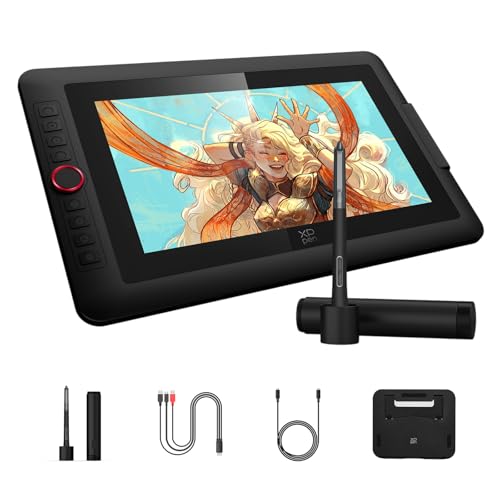
XP-Pen Artist 13.3 Pro V2
Best for: Beginners needing a compact pen display with controls
- Screen Size
- 13.3"
- Display Resolution
- Full HD
- Pen Pressure
- 16K
- Color Gamut
- 125% sRGB, 107% Adobe RGB, 95% P3
- Display Finish
- Full-Laminated AG Glass
- Shortcut Controls
- Red Dial, 8 customizable keys
This 13.3-inch pen display connects to your computer for drawing. It features a full-laminated screen with AG glass and 16K pressure levels. The device includes a red dial and eight shortcut keys for control. It covers 99% sRGB color gamut with Full HD resolution. This model suits beginners and illustrators who need a reliable screen for graphic design tasks on Windows or Mac.
- 16K pressure levels for precise line control
- Full-laminated screen with AG glass reduces parallax
- Includes red dial and eight customizable shortcut keys
- 99% sRGB and 107% Adobe RGB color coverage
- Full HD IPS display with 178-degree viewing angles
- 13.3-inch screen is smaller than the 15.6-inch and 23.8-inch models on this list
- Weighs 2.5 pounds, which is heavier than the 11-inch wireless options
- Requires a computer connection and is not a standalone tablet
- You want a full-laminated screen with high color accuracy
- You prefer physical controls like a dial and shortcut keys
- You need a reliable pen display for Windows or Mac
- You require a wireless or standalone drawing tablet
- You need a screen larger than 13.3 inches
- You want a lighter device for frequent travel
Verdict: XP-Pen Artist 13.3 Pro V2 fits illustrators who want a compact, accurate pen display with physical controls. It is a solid choice for beginners who value a dial and shortcut keys over wireless freedom.

XP-Pen Magic Drawing Pad 12.2 Standalone
Best for: portable standalone digital art on the go
- Tablet Type
- Standalone
- Screen Size
- 12.2"
- Display Resolution
- 2160×1440
- Pen Pressure
- 16384
- Color Gamut
- 97% sRGB
- Storage
- 256GB
This is a standalone drawing tablet that requires no computer. It features a 12.2-inch display with 2160×1440 resolution and 97% sRGB color coverage. The device includes 8GB RAM and 256GB storage for local projects. It supports 16384 pressure levels with the X3 Pro Slim Stylus. An 8000mAh battery provides up to 13 hours of use. You can use it for drawing, reading, or media on the go.
- 12.2-inch screen with 2160×1440 resolution
- 16384 pressure levels with tilt support
- 8000mAh battery lasts up to 13 hours
- 8GB RAM and 256GB internal storage
- Lightweight build at 599g
- 12.2-inch display is smaller than the 15.6-inch and 23.8-inch models on this list
- 16384 pressure levels are fewer than the 16K (higher count) options available in other XP-Pen models
- Single 12.2-inch size option limits workspace choice compared to larger standalone or monitor tablets
- You want a portable device that works without a computer
- You need a lightweight tablet for travel or outdoor sketching
- You prefer a compact 12.2-inch screen for focused work
- You require a large screen larger than 15.6 inches
- You need a pen display that connects directly to a PC
- You want a 4K OLED display for maximum color precision
Verdict: XP-Pen Magic Drawing Pad 12.2 Standalone is a portable standalone tablet for artists who prioritize mobility and battery life over large screen real estate or PC connectivity.

XP-Pen Artist 13.3 Pro V2
Best for: Compact desktop drawing with high color accuracy
- Tablet Type
- Pen Display
- Screen Size
- 13.3-inch
- Display Resolution
- 1920×1080 FHD
- Pen Pressure
- 16,384 levels
- Color Gamut
- 99% sRGB, 89% Adobe RGB, 95% P3
- Display Finish
- Fully laminated
This 13.3-inch pen display connects via USB-C or HDMI to your computer. It features a 16K pressure-sensitive stylus and a fully laminated FHD screen with 95% P3 color coverage. The metal back panel aids heat dissipation, while the dual-mode design lets you switch between drawing on-screen and using it as a traditional tablet. It suits artists who need precise control and portable connectivity.
- 16K pressure sensitivity with X3 Pro smart chip
- Fully laminated 13.3-inch FHD display
- 95% P3 cinema-grade color gamut
- Metal back panel for heat dissipation
- Heavier at 6.79 pounds compared to lighter wireless models
- 13.3-inch screen is smaller than the 15.6-inch and 23.8-inch options on this list
- Requires a computer connection; it is not a standalone device
- You want a compact 13.3-inch screen for desk work
- You need high color accuracy with 95% P3 coverage
- You prefer a metal build for better heat management
- You need a standalone tablet without a computer
- You prefer a larger 23.8-inch or 15.6-inch display
- You want a wireless Bluetooth connection only
Verdict: XP-Pen Artist 13.3 Pro V2 fits artists who prioritize color accuracy and a compact form factor. It is ideal for those who need a reliable pen display with a metal chassis for their desktop or laptop setup.

XP-Pen Artist Ultra 16 15.6" Touchscreen
Best for: color-accurate illustration and touch-enabled workflows
- Tablet Type
- Tethered pen display
- Screen Size
- 15.6"
- Display Resolution
- 3840 x 2160 UHD
- Pen Pressure
- 16384
- Color Gamut
- 99% Adobe RGB, 99% sRGB, 98% Display P3
- Display Finish
- Laminated, etched glass, AF coating
The XP-Pen Artist Ultra 16 is a 15.6-inch drawing display with a 4K OLED touchscreen. It features 99% Adobe RGB color coverage and 16K pen pressure levels. You connect it to a computer via USB-C or HDMI. The X-Touch interaction allows multi-point gestures for zooming and rotating. This tablet suits professionals needing precise color accuracy and intuitive touch controls.
- 15.6-inch 4K OLED display with 100,000:1 contrast ratio
- 99% Adobe RGB and 99% sRGB color gamut coverage
- 16K pen pressure levels with 60° tilt support
- Multi-point X-Touch interaction for canvas manipulation
- Includes ACK05 remote with 40 customizable shortcut keys
- 15.6-inch screen is smaller than the 23.8-inch and 24-inch models on this list
- Weighs 3.37 pounds, which is heavier than many pen displays
- Requires a computer connection; it is not a standalone device
- You need professional color accuracy for print or web design
- You prefer using touch gestures to navigate your canvas
- You want a compact 15.6-inch display for your workspace
- You need a standalone tablet that works without a computer
- You require a larger screen size for detailed work
- You want a lighter device for frequent portability
Verdict: The XP-Pen Artist Ultra 16 15.6" Touchscreen delivers professional color fidelity and responsive touch controls for creative work. It is a solid choice for designers who value color accuracy and gesture-based navigation on a mid-sized display.

XP-Pen Artist 12 11.9" Drawing Tablet
Best for: Portable drawing with dial controls
- Tablet Type
- Tethered pen display
- Screen Size
- 11.9 inch
- Display Resolution
- 1920×1080 Full HD
- Pen Pressure
- 16,384 levels
- Color Gamut
- 99% sRGB
- Display Finish
- Full lamination, AG etched glass
The XP-Pen Artist 12 offers an 11.9-inch Full HD display with 99% sRGB coverage and 16K pressure sensitivity. It features an anti-glare etched glass screen for reduced eye strain and includes dual X-Dial wheels for quick adjustments. Weighing 2.48 pounds, it is portable enough for students and freelancers. The tablet connects via a single USB-C cable and supports major operating systems.
- 11.9-inch Full HD screen with 99% sRGB color accuracy
- 16,384 pressure levels with 60-degree tilt support
- Dual X-Dial wheels for instant brush and zoom control
- Anti-glare etched glass reduces 85% of glare
- Single USB-C cable for clean connectivity
- Heavier build at 2.48 pounds compared to lighter competitors
- 11.9-inch screen is smaller than many 13-inch or larger models on this list
- 16K pressure resolution is lower than the 16K+ or 26K options available in other XP-Pen models
- You want a portable pen display with physical dial controls
- You need accurate color reproduction for design or illustration work
- You prefer an anti-glare screen for comfortable long sessions
- You require a screen larger than 12 inches for detailed work
- You need a standalone device without a computer connection
- You prioritize the lightest possible drawing tablet for travel
Verdict: The XP-Pen Artist 12 11.9" Drawing Tablet suits artists who value physical dial controls and a portable form factor. It is a solid choice for students and freelancers who need accurate colors in a compact package.

XP-Pen Artist 12 Pro Lite 11.6-Inch
Best for: portable sketching and direct computer connection
- Screen Size
- 11.6"
- Display Resolution
- 1920×1080
- Pen Pressure
- 8192 levels
- Display Finish
- Fully laminated glass
- Shortcut Controls
- Red Dial, 8 shortcut keys
- Features
- Stylus, Stylus Pen, Battery-Free Pen, Shortcut Keys, Tilt Support, Dial
The XP-Pen Artist 12 Pro Lite is an 11.6-inch pen display with a 1920×1080 IPS screen. It features 8192 pressure levels and 60-degree tilt support for natural shading. The device includes a customizable red dial and eight shortcut keys. You get a 3-in-1 cable for direct connection without adapters. It supports Windows, macOS, ChromeOS, and Linux for versatile creative work.
- 11.6-inch full-laminated IPS display with 1920×1080 resolution
- 8192 pressure levels for precise stroke control
- 60-degree tilt support for natural shading
- Customizable red dial and eight shortcut keys
- 3-in-1 cable design for direct computer connection
- 8192 pressure levels are lower than the 16384 or 16K found in other models on this list
- 11.6-inch screen size is smaller than the 12.2, 13.3, 15.6, 22, and 23.8-inch options available elsewhere in the guide
- You want a portable pen display with a direct 3-in-1 cable connection
- You need a 11.6-inch screen for sketching or annotation on the go
- You require tilt support and shortcut keys for efficient digital art creation
- You prefer a larger canvas like 15.6 inches or bigger for detailed work
- You need the highest pressure sensitivity available, such as 16K levels
- You want a standalone tablet that does not require a computer connection
Verdict: XP-Pen Artist 12 Pro Lite 11.6-Inch offers a compact, connected drawing experience with standard tilt and pressure specs. It fits artists who prioritize portability and direct connectivity over large screens or maximum sensitivity.

XP-Pen Artist24 FHD 23.8-Inch Pen Display
Best for: Large canvas digital illustration
- Tablet Type
- Tethered pen display
- Screen Size
- 23.8"
- Display Resolution
- 1920×1080 FHD
- Pen Pressure
- 8192 levels
- Color Gamut
- 132% sRGB
- Display Finish
- Fully laminated, anti-glare matte
The XP-Pen Artist24 FHD is a 23.8-inch pen display with a 1920×1080 resolution and 132% sRGB color gamut. It features a fully-laminated screen and a battery-free stylus with 8192 pressure levels. This large canvas suits artists who want to reduce zooming and zooming out. The adjustable stand allows for comfortable drawing angles. It connects via USB-C to Windows, Mac, and Chrome OS.
- 23.8-inch large screen reduces the need to zoom
- 132% sRGB color gamut for accurate color reproduction
- Battery-free stylus with 8192 pressure levels and tilt recognition
- Fully-laminated display with anti-glare matte texture
- Adjustable stand supports angles from 16° to 90°
- 1920×1080 resolution is lower than the 4K OLED option on the list
- 8192 pressure levels are fewer than the 16K levels found in other models
- 26-inch length makes it bulkier than smaller tablet options
- You need a large canvas for detailed illustration work
- You prefer a fully-laminated display for a natural drawing feel
- You want an adjustable stand for ergonomic positioning
- You require 4K resolution for professional color grading
- You need the highest 16K pressure sensitivity levels
- You want a compact tablet for portable use
Verdict: The XP-Pen Artist24 FHD 23.8-Inch Pen Display fits illustrators who prioritize screen real estate and color accuracy over maximum resolution. It is a solid choice for desktop setups where size is not a constraint.
Specifications side by side
| Spec | XPPen 10.95" Android Drawing Tablet | XP-PEN Artist12 11.6-Inch Pen Display | XP-Pen Artist 15.6 Pro Drawing Tablet | XP-Pen Artist 22 2nd 21.5-Inch Display | XPPen Artist Pro 14 Gen2 14-Inch Pen Display | XPPen Deco Pro LW 11-Inch Wireless Tablet | XPPen Magic Drawing Pad 12.2" 256GB | XPPen Artist Pro 24 Gen2 23.8-inch | XP-Pen Artist 13.3 Pro V2 | XP-Pen Magic Drawing Pad 12.2 Standalone | XP-Pen Artist 13.3 Pro V2 | XP-Pen Artist Ultra 16 15.6" Touchscreen | XP-Pen Artist 12 11.9" Drawing Tablet | XP-Pen Artist 12 Pro Lite 11.6-Inch | XP-Pen Artist24 FHD 23.8-Inch Pen Display |
|---|---|---|---|---|---|---|---|---|---|---|---|---|---|---|---|
| Tablet Type | Standalone | – | – | Tethered pen display | Tethered pen display | – | Standalone | Tethered pen display | – | Standalone | Pen Display | Tethered pen display | Tethered pen display | – | Tethered pen display |
| Screen Size | 10.95-inch | 11.6" | 15.6" | 21.5" | 14" | – | 12.2-inch | 23.8 inches | 13.3" | 12.2" | 13.3-inch | 15.6" | 11.9 inch | 11.6" | 23.8" |
| Display Resolution | – | 1920×1080 FHD | 1920×1080 FHD | – | – | – | 2160*1440 | 2560×1440 2.5K QHD | Full HD | 2160×1440 | 1920×1080 FHD | 3840 x 2160 UHD | 1920×1080 Full HD | 1920×1080 | 1920×1080 FHD |
| Pen Pressure | 16384 | 8192 | 16384 levels | 8192 levels | 16384 levels | 16384 levels | 16,384 levels | 16,384 levels | 16K | 16384 | 16,384 levels | 16384 | 16,384 levels | 8192 levels | 8192 levels |
| Color Gamut | – | 72% NTSC (100% sRGB) | 88% NTSC (120% sRGB) | 86% NTSC (Adobe RGB≥90%, sRGB≥122%) | 99% sRGB, 123% sRGB | – | 97% sRGB | 99% Adobe RGB, 99% sRGB, 94% P3 | 125% sRGB, 107% Adobe RGB, 95% P3 | 97% sRGB | 99% sRGB, 89% Adobe RGB, 95% P3 | 99% Adobe RGB, 99% sRGB, 98% Display P3 | 99% sRGB | – | 132% sRGB |
| Refresh Rate | 90Hz | – | – | – | – | – | – | 165Hz | – | – | – | – | – | – | – |
| Display Finish | AG nano-etching, anti-glare | anti-reflective screen protector | Full-laminated | – | Full laminated, anti-glare etched glass | – | AG-etched | Full-laminated, AG etched, AF glass | Full-Laminated AG Glass | – | Fully laminated | Laminated, etched glass, AF coating | Full lamination, AG etched glass | Fully laminated glass | Fully laminated, anti-glare matte |
| Shortcut Controls | – | 6 shortcut keys, slim touch bar | 8 shortcut keys, Red Dial | – | Wireless Shortcut Remote | Keypad with physical scroll wheel | – | Wireless remote (10 keys, dial) | Red Dial, 8 customizable keys | – | Red dial roller, 8 express keys | ACK05 shortcut remote (40 keys) | Dual X-Dial wheels, 8 keys | Red Dial, 8 shortcut keys | – |
| Storage | – | – | – | – | – | – | 256GB | – | – | 256GB | – | – | – | – | – |
| Operating System | Android | – | – | Windows | – | Android | – | – | Android | – | Android | Android | Android | – | – |
| Use | Note-Taking | – | – | – | – | – | – | – | – | – | – | – | – | – | – |
| Features | Tilt Support | Stylus, Stylus Pen, Battery-Free Pen | Stylus, Stylus Pen, Shortcut Keys, Tilt Support, Dial | Stylus, Stylus Pen, Battery-Free Pen, Shortcut Keys, Tilt Support | Stylus, Stylus Pen, Battery-Free Pen, Tilt Support, Dial | Stylus, Stylus Pen, Bluetooth, Dial | Stylus, Stylus Pen, Tilt Support | Stylus, Stylus Pen, Dial | Stylus, Stylus Pen, Shortcut Keys, Dial | – | Stylus, Stylus Pen | Stylus, Stylus Pen, Dial | Stylus, Stylus Pen, Shortcut Keys, Dial | Stylus, Stylus Pen, Battery-Free Pen, Shortcut Keys, Tilt Support, Dial | Stylus, Stylus Pen, Battery-Free Pen |
| Display | Anti-Glare | – | Full-Laminated | – | Full-Laminated | – | – | Full-Laminated | Full-Laminated | – | Full-Laminated | Touchscreen | Anti-Glare | Full-Laminated | Full-Laminated |
| Color | Silver White | Black | Red | – | Black | Black | Purple | 23.8inch with 165hz | Black | Black | black 13.3inch | – | Black | Black | 23 inch |
| Audience | – | – | – | – | – | Animation | – | – | Animation, Beginners | – | – | – | Animation, Beginners | – | Animation |
| Weight | 3.55 pounds | 2 pounds | 7.28 pounds | – | – | – | 1.3 pounds | 19 pounds | 2.5 pounds | 1.3 pounds | 6.79 pounds | 3.37 pounds | 2.48 pounds | – | – |
| Dimensions | – | 14.3 × 8.58 × 0.31 inches | 17.4 × 11 × 0.51 inches | 23.4 × 5.5 × 16.5 inches | – | – | – | 29.1 × 19.3 × 0.1 inches | – | – | 15 × 9.5 × 0.1 inches | – | – | – | 26 × 18.4 × 5.9 inches |
| Length | – | – | – | – | 5.02 inches | 13.1 inches | 11.4 inches | – | 17 inches | – | – | 15.9 inches | 14.4 inches | – | – |
| Width | – | – | – | – | 14 inches | 10.2 inches | 7.48 inches | – | 11 inches | – | – | 13.5 inches | 9.17 inches | – | – |
| Size | 7.17 x 10.16 x 0.28 inches | 11.6 inch | 15.6 Inch | 21.5 Inch | 14 inch | 11 Inch | 279 x 192 x 6.9 mm | 23.8 Inch-165hz | 13.3 INCH | 12.2 inch | 13.3 inch | 15.6" | 11.9 inch | 11.6 inch | 23.7 Inch |
| Model | 52e86482-279f-4728-80b7-089e325299ba | Artist 12_SML | Artist 15.6 Pro | ArtistCD220F_US | MD140FH | Deco Pro LW (Gen 2)+ACK05 | Magic Drawing Pad | MD240QH-US-XP | Artist 13.3 Pro V2 | X3 Pro | Artist13.3 Pro V2 | Ultra16 | Artist 12 3rd | Artist 12 Pro Lite | Artist24 FHD |
Who XP-Pen Drawing Tablets Suit
XP-Pen covers mobile sketching and stationary design. You can choose compact 10.95-inch standalone pads for portable note-taking or larger 23.8-inch pen displays for desktop illustration. The range includes wireless options like the Deco Pro LW for artists who prefer a large workspace without cables. Most models feature full-laminated screens and 16K pressure sensitivity for precise control. You will find no traditional non-display graphics tablets in this list. The lineup also lacks dedicated iOS support, focusing instead on Android and Windows environments for connected workflows.
How to choose the right XP-Pen tablet
Pick standalone or connected
Decide if you need a portable standalone device or a desktop pen display. Standalone models like the Magic Note Pad 10.95" run Android and work without a computer. This setup suits those who prioritize mobility and natural friction for sketching on the go. Connected pen displays require a PC or laptop to function. They are ideal for stationary desk setups where screen real estate matters most. Choose standalone for wireless freedom, or connected for precise desktop control.
Check screen size needs
Select a screen size that matches your workspace and portability goals. The XPPen Artist 12 offers an 11.6-inch display for compact sketching. The Artist 15.6 Pro provides 15.6 inches for detailed work. The Artist Pro 24 Gen2 features a large 23.8-inch screen for professionals needing maximum canvas space. Larger screens require more desk area and often add weight. Smaller models fit easily in bags. Measure your desk space before buying to ensure the tablet fits comfortably.
Evaluate pen pressure levels
Look at the pen pressure sensitivity to determine drawing precision. Most models offer 16K pressure levels for fine control. The Artist 12 and Artist 12 Pro Lite use 8192 levels. Higher levels allow for smoother line variations and subtle shading. This spec matters for artists who need nuanced strokes. Check the attributes section for the exact number. Ensure the stylus is battery-free for consistent performance without charging interruptions. Match the pressure rating to your artistic style.
Review display technology
Consider the display type for visual clarity and comfort. Full-laminated screens, found on the Artist 15.6 Pro and Artist Pro 14 Gen2, reduce parallax for a more natural writing feel. Anti-glare displays, like those on the Magic Note Pad, reduce reflections in bright environments. Touchscreen models, such as the Artist Ultra 16, add gesture navigation. Choose based on your lighting conditions and need for tactile feedback. Lamination improves accuracy, while anti-glare helps outdoors.
Assess storage and OS
Check the operating system and storage for standalone models. The Magic Drawing Pad 12.2 includes 256GB of storage for saving projects directly on the device. This feature supports mobile artists who need ample space for large files. Connected displays do not require internal storage as they rely on the host computer. Verify the OS version if you plan to use specific apps. Standalone units run Android, offering app flexibility. Ensure the storage capacity meets your workflow demands.
Look for physical controls
Identify if you need shortcut keys or a dial for efficiency. The Artist 15.6 Pro and Artist Pro 14 Gen2 include a dial for precise adjustments. Shortcut keys are available on many pen displays for quick tool access. These controls speed up workflows by reducing reliance on menus. Check the features list for dial and key availability. Wireless models like the Deco Pro LW also offer dials for desktop use. Physical controls are valuable for intensive editing or animation tasks.
Frequently asked questions
Does XP-Pen make a standalone drawing tablet?
Yes, XP-Pen offers standalone Android tablets that operate without a computer. The Magic Note Pad 10.95" and Magic Drawing Pad 12.2" are portable options with 256GB of storage. These devices provide a paper-like experience for sketching and note-taking on the go.
Which XP-Pen tablet has the highest pressure sensitivity?
Several models, including the Artist 15.6 Pro and Artist Pro 14 Gen2, offer 16K levels of pen pressure. This specification allows for finer control over line weight and opacity. The Deco Pro LW and Magic Drawing Pad 12.2" also feature this high sensitivity for detailed work.
Are there XP-Pen tablets with a dial control?
Yes, several pen displays include a physical dial for easier navigation. The Artist 15.6 Pro, Artist Pro 14 Gen2, and Artist Ultra 16 all feature this control. The dial helps you adjust settings or brush size without moving your hand away from the drawing area.
What is the largest screen size available from XP-Pen?
The largest screen size is 23.8 inches, found in the Artist Pro 24 Gen2 and Artist24 FHD. These models provide ample canvas space for detailed illustration and animation. They are designed for stationary desktop setups where screen real estate is a priority.
Does the Artist Ultra 16 support touch input?
Yes, the XP-Pen Artist Ultra 16 is a touchscreen pen display. It combines stylus precision with touch controls for gesture-based navigation. This feature suits designers who want responsive interaction for color-accurate illustration and workflow efficiency on a mid-sized display.
Is the Deco Pro LW wireless?
Yes, the XP-Pen Deco Pro LW is a wireless drawing tablet. It connects via Bluetooth and offers an 11-inch active area. This model is ideal for artists who want a large workspace without the clutter of cables, though it requires a separate display.
Do XP-Pen styluses require batteries?
Most XP-Pen pens are battery-free, including those for the Artist 12, Artist 15.6 Pro, and Artist Pro 14 Gen2. These styluses rely on electromagnetic resonance for power. This design ensures consistent performance without the need to charge or replace batteries during long sessions.
Which XP-Pen tablet is best for beginners?
The Artist 13.3 Pro V2 and Artist 12 are solid choices for beginners. Both offer compact sizes and full-laminated screens for accurate drawing. The Artist 13.3 Pro V2 includes shortcut keys and a dial, while the Artist 12 provides portable convenience with dial controls.


