HUION Kamvas Pro 16 Drawing Tablet Review: Who It Fits and Who Should Skip It
This huion kamvas pro 16 drawing tablet review focuses on a pen display designed for digital artists who need precision and color accuracy.

What this report covers
- Last updated
- 4 Nov 2026
Figures above are read from the product listings for the models named below. Scores are out of 10, based on listed specifications and buyer feedback.
As Amazon Associates, we earn from qualifying purchases. This means we may receive a small commission at no extra cost to you if you click through and make a purchase.
As an Amazon Associate we earn from qualifying purchases. Links on this page are affiliate links.
This huion kamvas pro 16 drawing tablet review focuses on a pen display designed for digital artists who need precision and color accuracy. The device features a 15.6-inch full-laminated screen with anti-glare glass, providing a smooth surface for natural drawing. It covers 120% of the sRGB color gamut, ensuring vibrant and true-to-life visuals. The included battery-free pen offers 60-degree tilt recognition and lag-free tracking. This setup connects to your computer via a single USB-C cable, simplifying your workspace while delivering professional-grade performance for creative software.
- 15.6-inch full-laminated display with anti-glare glass
- 120% sRGB color gamut for vibrant colors
- Battery-free pen with 60-degree tilt recognition
- Touch bar and six express keys for shortcuts
- Single USB-C cable for simplified connectivity
Good fit for
This tablet suits digital illustrators and graphic designers who work primarily on a desktop or laptop. The 15.6-inch screen offers ample space for detailed work, while the 120% sRGB coverage ensures accurate color representation. If you use software like Adobe Photoshop or Clip Studio Paint, the express keys and touch bar streamline your workflow. The adjustable stand helps reduce neck strain during long sessions. It is ideal for users who want a dedicated drawing surface that integrates seamlessly with their existing computer setup.
Who can skip it
You should look elsewhere if you need a standalone device. The Kamvas Pro 16 must be connected to a computer to function; it does not have built-in processing power. If you require portability without a host machine, this pen display is not suitable. Additionally, if you prefer a smaller screen for travel, consider the 13.3-inch variation. The device is also not ideal for users who do not use creative software, as it is designed specifically for digital art and design tasks rather than general computing.
Verdict
The HUION Kamvas Pro 16 is a solid choice for artists seeking a color-accurate, laminated pen display. Its combination of a large screen, precise pen, and convenient controls makes it a practical tool for creative workflows.
Key specs explained
Screen Size 15.6 Inch
This diagonal measurement gives you a workspace similar to a small laptop monitor. You get enough room to view complex art layers or use multiple tool palettes without constant scrolling. For digital artists, this size balances portability with detailed visibility. It is larger than standard 13-inch tablets, offering more precision for fine strokes while remaining manageable on a desk.
Display Full-Laminated
Full lamination bonds the glass cover directly to the display panel, removing the air gap between them. This means your pen tip appears to touch the image directly, reducing parallax error. The result is a more natural drawing experience where your hand movements align precisely with what you see on screen. It also improves clarity and reduces internal reflections.
Color 120% sRGB
This color gamut volume covers more colors than the standard sRGB baseline used by most web content. You will see vibrant, true-to-life hues in your digital paintings, especially in reds and greens. This is crucial for illustrators and graphic designers who need accurate color representation. It ensures your final work looks consistent across different devices and platforms.
Weight 2.98 pounds
At nearly three pounds, this pen display is substantial but not overly heavy for a stationary desk setup. It provides stability during vigorous drawing sessions, reducing the chance of sliding. While not designed for frequent travel like a lightweight e-reader, its weight keeps it firmly in place. You can adjust the angle using the included stand to find a comfortable posture.
Design and Build Quality
According to the listing, the HUION Kamvas Pro 16 measures 17.2 inches in length, 9.88 inches in width, and 0.47 inches in height. It weighs 2.98 pounds. This footprint places it firmly in the mid-size category for pen displays. You can set it on a standard desk without dominating your workspace. The black finish is described as having a smooth but slight texture on the glass. This surface treatment is intended to provide friction similar to paper, which helps you control your strokes more naturally than on slippery plastic.
The device includes an adjustable stand that allows you to tilt the screen between 20 and 60 degrees. This range lets you find a comfortable viewing angle to reduce neck and shoulder strain during long drawing sessions. On the left side of the unit, you will find six customized express keys and a touch bar. These controls give you quick access to shortcuts for zooming, adjusting brush size, or saving files. You do not need to reach for your keyboard for common tasks.
Connection is handled by a single 3-in-1 USB-C cable that carries HDMI signals. This design keeps your desk tidier by reducing the number of separate wires you need to manage. The listing notes that this is a pen display, not a standalone tablet. You must connect it to a computer or laptop to use it. The build focuses on a stable, connected workflow rather than portability. You should plan your setup around a fixed desk position.
Setup and Everyday Use Guide
You must connect this device to a computer or laptop. It is not a standalone unit. The listing specifies a 3-in-1 USB-C cable that handles HDMI signal and other connections. This single cable helps keep your desk tidy by reducing wire clutter. You need a compatible host system to power and drive the display.
The tablet supports Windows 7 or later, macOS 10.12 or later, and Linux Ubuntu. You should check your operating system version before connecting. The device works with creative software like Adobe Photoshop, Clip Studio Paint, SAI, and Lightroom. You can map functions to the hardware controls within these programs.
For daily drawing, you use the included battery-free pen. It offers 60-degree tilt recognition and responsive tracking. The pen has two programmable side buttons for software shortcuts. You can adjust the included ST200 stand between 20 and 60 degrees. This range helps you find a comfortable angle for your neck and shoulders.
Six express keys and a touch bar sit near the screen. You can assign these to favorite shortcuts. This allows you to zoom, adjust brush size, or save files without moving your hand to the keyboard. The screen features a smooth surface with slight texture for natural pen movement. The anti-glare glass reduces reflections during long sessions.
Before You Buy This Pen Display
You must connect this pen display to a computer or laptop. It does not work as a standalone device. Check that your machine runs Windows 7 or later, macOS 10.12 or later, or Linux Ubuntu. Ensure your creative software, such as Adobe Photoshop or Clip Studio Paint, is compatible. The included 3-in-1 USB-C cable simplifies connections, but verify your ports match. This tablet sits in a unique category. Unlike the 1 other Tablets & E-Readers on this page, it requires a host system. You need a powerful computer to drive its 120% sRGB color gamut and full-laminated screen. Keep the anti-glare glass clean with a soft, dry cloth. The adjustable stand helps reduce neck strain, but ensure your desk has enough depth for the 17.2-inch length. This device suits artists who already own a capable PC or Mac, rather than those seeking a portable, all-in-one solution.
Check before you buy
- Confirm your computer runs Windows 7, macOS 10.12, or Linux.
- Check if your software supports external pen displays.
- Verify your device has an available USB-C or HDMI port.
- Ensure your desk space fits the 17.2-inch length.
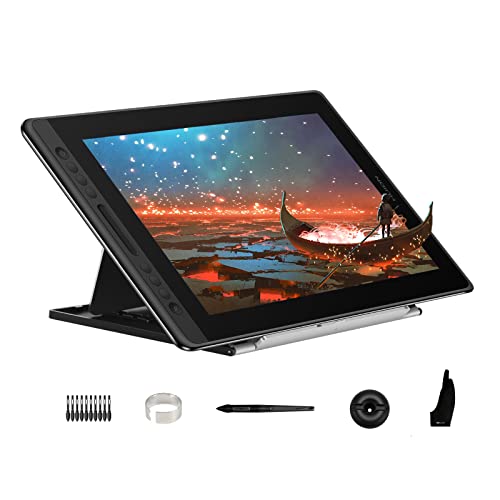
HUION Kamvas Pro 16 15.6-Inch Pen Display
Best for: artists needing a large, color-accurate pen display
- Tablet Type
- Tethered pen display
- Screen Size
- 15.6"
- Color Gamut
- 120% sRGB (92% AdobeRGB)
- Display Finish
- Fully laminated anti-glare glass
- Shortcut Controls
- 6 express keys, touch bar
- Operating System
- Windows
The Huion Kamvas Pro 16 is a 15.6-inch pen display designed for digital artists who need a large, clear workspace. It features a full-laminated screen with anti-glare glass and a 120% sRGB color gamut for accurate color reproduction. The device includes an adjustable stand and a touch bar for workflow efficiency. You will need a computer to operate it, as it is not a standalone unit.
- 15.6-inch full-laminated screen with anti-glare glass
- 120% sRGB color gamut and 1000:1 contrast ratio
- Battery-free pen with 60-degree tilt recognition
- Adjustable stand moves between 20 and 60 degrees
- Touch bar and six express keys for shortcuts
- 2.98-pound weight adds bulk to your setup
- Requires connection to a computer to function
- 1000:1 contrast ratio is standard for this class
- You need a large 15.6-inch canvas for detailed work
- You want accurate color representation with 120% sRGB
- You prefer physical shortcut keys and a touch bar
- You need a standalone tablet without a computer
- You require a portable device under 3 pounds
- You want a screen smaller than 15.6 inches
Verdict: The Huion Kamvas Pro 16 15.6-Inch Pen Display fits artists who prioritize screen real estate and color accuracy. It serves as a robust monitor for creative software when paired with a computer.
Specifications side by side
| Spec | HUION Kamvas Pro 16 15.6-Inch Pen Display |
|---|---|
| Tablet Type | Tethered pen display |
| Screen Size | 15.6" |
| Color Gamut | 120% sRGB (92% AdobeRGB) |
| Display Finish | Fully laminated anti-glare glass |
| Shortcut Controls | 6 express keys, touch bar |
| Operating System | Windows |
| Features | Shortcut Keys |
| Display | Full-Laminated |
| Color | Black |
| Dimensions | 17.2 × 9.88 × 0.47 inches |
| Weight | 2.98 pounds |
| Size | 15.6 Inch |
| Model | Kamvas Pro 16 |
Frequently asked questions
Is the HUION Kamvas Pro 16 a standalone tablet?
No, it is not standalone. You must connect it to a computer to use it. The device functions as a pen display that relies on your host machine for processing power. It does not have its own operating system or storage. You need a running computer to draw on the screen.
What screen technology does this model use?
It features a full-laminated display. This technology reduces the gap between the glass and the pixels. You get a more natural drawing feel because your pen tip appears closer to the actual line. The screen is also black and measures 15.6 inches diagonally for ample workspace.
Does it include shortcut keys?
Yes, the device includes shortcut keys. These physical buttons allow you to assign common functions in your creative software. You can map actions like undo, redo, or brush size changes to these keys. This setup helps streamline your workflow without reaching for your keyboard.
What are the physical dimensions of the tablet?
The tablet measures 17.2 inches in length and 9.88 inches in width. Its height is 0.47 inches. It weighs 2.98 pounds. These dimensions place it in a mid-size category for pen displays. You can fit it on most standard desks without taking up excessive space.
Is this display suitable for professional color work?
Yes, it is designed for color accuracy. The product listing highlights it as ideal for artists needing precise color reproduction. The 15.6-inch screen provides enough real estate to view complex layers. You can rely on its color performance for professional digital art and design projects.
What operating systems does it support?
It supports Windows, macOS, and Linux Ubuntu. You need a computer running Windows 7 or later, macOS 10.12 or later, or Linux Ubuntu to use it. The device acts as a peripheral for these systems. Ensure your computer meets these requirements before purchasing.


