Standalone or Pen Tablet Drawing Tablets? Compared by Specs
Choosing between a standalone vs pen tablet drawing tablet depends on your workflow.

What this report covers
- Last updated
- 4 Nov 2026
Figures above are read from the product listings for the models named below. Scores are out of 10, based on listed specifications and buyer feedback.
As Amazon Associates, we earn from qualifying purchases. This means we may receive a small commission at no extra cost to you if you click through and make a purchase.
As an Amazon Associate we earn from qualifying purchases. Links on this page are affiliate links.
Choosing between a standalone vs pen tablet drawing tablet depends on your workflow. Both devices support digital art and note-taking with pressure-sensitive pens. The main difference lies in independence. The XPPen runs Android 14, offering a built-in screen and apps. The Wacom requires a computer, acting as an input peripheral. Your choice hinges on whether you need a portable, self-contained device or a dedicated accessory for your desktop setup.
Tablet Type
Standalone
Pen Tablet
Operating System
Android 14
not listed
Display
10.95-inch color screen
not listed
Pen Pressure
16K Levels
not listed
Weight
3.55 pounds
14.9 ounces
Connectivity
not listed
not listed
Choose the first if
- You want a portable device that works without a computer.
- You prefer drawing directly on a vibrant color screen.
- You need a tablet that runs Android apps independently.
Choose the second if
- You already have a computer and want a dedicated input device.
- You prioritize a lightweight accessory that fits easily on a desk.
- You want to use established creative software on your main machine.
Verdict
The XPPen suits artists who need a portable, all-in-one solution for sketching on the go. The Wacom is better for users who already have a computer and want a simple, lightweight drawing surface. Choose based on whether you need independence or a desktop peripheral.
Standalone vs Pen Tablet Specs
Operating system
Edge: XPPen 10.95" Android Drawing Tablet
Product A runs Android 14, giving you a standalone experience. You can download apps from Google Play for sketching, note-taking, or reading without needing a computer. Product B is a Pen Tablet with no operating system listed. It requires a connected computer to function. If you want to draw anywhere without cables, the Android OS on Product A is the clear choice. Product B relies entirely on your host machine for software and power.
Display size
Edge: XPPen 10.95" Android Drawing Tablet
Product A features a 10.95-inch display with an AG nano-etching screen. It offers 16.7 million colors and a 90Hz refresh rate for smooth lines. Product B has a working area of 10.9 inches by 6.9 inches. The data does not list a screen resolution or color depth for Product B, as it is a non-display pen tablet. You view your work on your computer monitor while using Product B. For a direct drawing surface, Product A provides a larger, vibrant, and high-refresh-rate visual experience.
Weight and portability
Edge: Wacom Bamboo Capture Pen Tablet
Product A weighs 3.55 pounds and measures 0.28 inches thick. It is designed to be ultra-portable for on-the-go use. Product B weighs only 14.9 ounces and is 0.4 inches thick. While Product B is significantly lighter, it is not standalone. You must carry a computer to use it. Product A is self-contained. If you prioritize a single lightweight device that includes the screen, Product A is more practical. If you already carry a laptop, Product B adds minimal weight to your bag.
Pen pressure levels
Edge: XPPen 10.95" Android Drawing Tablet
Product A supports 16,384 pressure levels with its battery-free Pencil 2. It also includes tilt support for realistic shading. Product B includes a pressure-sensitive pen, but the specific pressure level count is not listed in the data. Both devices offer precise control for digital art. However, the explicit 16K level count and tilt support on Product A provide detailed specifications for nuanced strokes. Without the exact pressure count for Product B, Product A offers more defined technical advantages for artistic control.
Connectivity and setup
Edge: XPPen 10.95" Android Drawing Tablet
Product A is a standalone device. It does not require a computer connection to operate its core functions. It runs Android 14 independently. Product B is a Pen Tablet that connects to a computer via USB or Bluetooth (connection type not specified, but computer dependency is clear). It requires drivers and software on the host machine. If you want to start drawing immediately without installing software or finding a computer, Product A is simpler. Product B requires a full computer setup to function.
Which drawing tablet fits your needs
Artists wanting a standalone Android device
Our pick: XPPen 10.95" Android Drawing Tablet
You need a self-contained tool for sketching on the go. This XPPen tablet runs Android 14, allowing you to download apps from Google Play without a computer. Its 10.95-inch X-Paper display offers a paper-like texture with 16,384 pressure levels. The 90Hz refresh rate ensures smooth lines, making it ideal for digital artists who want independence and a vibrant color screen.
Users needing a compact desktop pen tablet
Our pick: Wacom Bamboo Capture Pen Tablet
You prefer a lightweight device that connects to your existing computer. This Wacom pen tablet weighs only 14.9 ounces and features four express keys for quick shortcuts. It is designed to work with creative software like Photoshop Elements. If you already have a monitor and PC, this smaller, simpler tablet provides a natural pen feel for editing photos and drawing directly on your screen.
Students taking notes and reading PDFs
Our pick: XPPen 10.95" Android Drawing Tablet
You want a versatile device for class notes and reading. The XPPen includes specific color modes for annotating notes or reading in black and white. Its anti-glare screen and low blue light certification reduce eye strain during long sessions. At 7mm thick and 495g, it is ultra-portable. You can take handwritten notes, annotate PDFs, and use the battery-free stylus without carrying extra chargers.
| # | Product | Best for | Price |
|---|---|---|---|
| 1 | XPPen 10.95" Android Drawing Tablet | Color sketching and Android app usage | |
| 2 | Wacom Bamboo Capture Pen Tablet | Computer-connected digital artists |

XPPen 10.95" Android Drawing Tablet
Best for: Color sketching and Android app usage
- Tablet Type
- Standalone
- Screen Size
- 10.95-inch
- Pen Pressure
- 16384
- Refresh Rate
- 90Hz
- Display Finish
- AG nano-etching, anti-glare
- Operating System
- Android
This standalone tablet features a 10.95-inch X-Paper display with AG nano-etching for a paper-like texture. It supports 16,384 pressure levels and offers a 90Hz refresh rate for smooth line transitions. The device runs Android 14 with 16.7 million colors in Natural Mode. It weighs 3.55 pounds and measures 7.17 x 10.16 x 0.28 inches. You can use it for sketching, note-taking, or reading in Ink Paper Mode.
- 10.95-inch X-Paper display with AG nano-etching
- 16,384 pressure levels for precise control
- 90Hz refresh rate for smooth transitions
- Runs Android 14 with Google Play access
- 16.7 million color display in Natural Mode
- Heavier build at 3.55 pounds compared to lighter pen tablets
- Thicker profile at 0.28 inches bulkier than ultra-slim e-readers
- Smaller 10.95-inch screen limits workspace vs larger standalone tablets
- You want a standalone device with full Android app access
- You prefer a color display for sketching and reading
- You need a paper-like texture with anti-glare technology
- You require a monochrome e-ink display for maximum battery life
- You need a lightweight pen tablet under 1 pound
- You prefer a smaller screen under 10 inches for portability
Verdict: XP-Pen 10.95" Standalone Color Tablet suits artists who need a color display with Android 14 for app downloads. It fits users who value a paper-like texture and 90Hz refresh rate for smooth drawing.
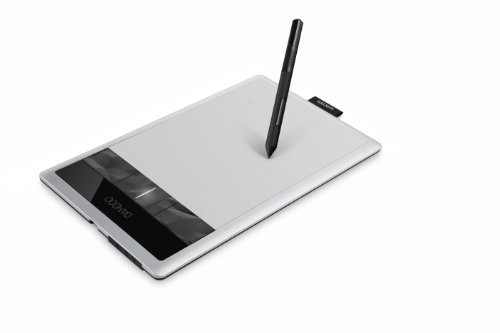
Wacom Bamboo Capture Pen Tablet
Best for: Computer-connected digital artists
- Tablet Type
- Pen Tablet
- Shortcut Controls
- 4 ExpressKeys
- Features
- Stylus, Stylus Pen
- Color
- Silver
- Dimensions
- 10.9 × 6.9 × 0.4 inches
- Weight
- 14.9 ounces
This Wacom Bamboo Capture is a pen tablet designed for digital drawing and photo editing. It features a pressure-sensitive pen and four express keys for quick shortcuts. The device measures 10.9 inches by 6.9 inches with a slim 0.4-inch profile. Weighing 14.9 ounces, it offers a portable form factor for creative work. It includes free software to help you get started with digital art.
- Pressure-sensitive pen for natural drawing feel
- Four express keys for quick shortcuts
- Includes Photoshop Elements and AutoDesk Sketchbook Express
- Slim 0.4-inch profile for portability
- Heavier at 14.9 ounces compared to lighter standalone tablets
- Smaller active area than the 10.95-inch standalone option
- Requires connection to a computer for operation
- You need a dedicated drawing surface for your computer
- You prefer physical express keys for shortcuts
- You want a slim and portable design for your desk
- You require a standalone device that works without a PC
- You need a larger canvas for detailed artwork
- You prefer a lighter device under 10 ounces
Verdict: Wacom Bamboo Capture Pen Tablet suits users who need a reliable, computer-connected drawing tool with physical shortcuts. It is a solid choice for artists who prioritize a slim profile and included creative software over standalone portability.
Specifications side by side
| Spec | XPPen 10.95" Android Drawing Tablet | Wacom Bamboo Capture Pen Tablet |
|---|---|---|
| Tablet Type | Standalone | – |
| Screen Size | 10.95-inch | – |
| Pen Pressure | 16384 | – |
| Refresh Rate | 90Hz | – |
| Display Finish | AG nano-etching, anti-glare | – |
| Shortcut Controls | – | 4 ExpressKeys |
| Operating System | Android | – |
| Use | Note-Taking | – |
| Features | Tilt Support | Stylus, Stylus Pen |
| Display | Anti-Glare | – |
| Color | Silver White | Silver |
| Weight | 3.55 pounds | 14.9 ounces |
| Dimensions | – | 10.9 × 6.9 × 0.4 inches |
| Size | 7.17 x 10.16 x 0.28 inches | – |
| Model | 52e86482-279f-4728-80b7-089e325299ba | CTH470 |
Frequently asked questions
Do I need a computer to use a standalone drawing tablet?
No, you do not need a computer. Standalone tablets like the XPPen 10.95" run Android 14. This allows you to download and use apps directly on the device. You can sketch, take notes, or edit images without connecting to another machine. It offers full portability for your creative workflow.
Is a pen tablet better than a standalone tablet for beginners?
It depends on your setup. Pen tablets like the Wacom Bamboo Capture are simpler and often more affordable. They connect to a computer you likely already own. Standalone tablets offer more freedom but require learning a new operating system. Beginners who want immediate app access may prefer the standalone option.
Can I draw without an internet connection on a standalone tablet?
Yes, you can draw offline. Once you install your preferred art apps, they function without a network. The XPPen 10.95" Android tablet supports this. You only need internet to download initial apps or sync files. Your core drawing tools remain available wherever you are, even in areas with no connectivity.
What is the difference between tilt support and pen pressure levels?
Tilt support detects the angle of your pen. This helps create natural shading effects. Pen pressure levels, like 16K on the XPPen, measure how hard you press. Higher levels offer smoother line variations. Both features enhance realism. The XPPen includes tilt support and high pressure sensitivity for detailed digital artwork.
Do pen tablets require drivers to work properly?
Yes, pen tablets typically require drivers. The Wacom Bamboo Capture connects to a computer. You must install software to enable features like shortcuts and pressure sensitivity. Standalone tablets like the XPPen run Android, so drivers are built-in. You do not need to configure external software for basic pen functionality on the standalone device.
Which tablet is lighter to carry around?
The Wacom Bamboo Capture is lighter. It weighs 14.9 ounces. The XPPen 10.95" weighs 3.55 pounds. If you prioritize portability and minimal weight, the pen tablet is easier to pack. However, the standalone tablet offers a larger screen and built-in battery. Choose based on whether you value weight or screen size.
Can I use physical shortcuts on a standalone drawing tablet?
It varies by model. The Wacom Bamboo Capture includes physical shortcuts for quick access. The XPPen 10.95" Android tablet uses on-screen controls or customizable app gestures. Standalone devices rely more on software interfaces. You can map functions within apps. Check the specific model for dedicated hardware buttons if you prefer tactile controls.


