Wacom Intuos Medium Bluetooth Graphics Drawing Tablet Review (2026): A Spec-Based Look
This wacom intuos medium bluetooth graphics drawing tablet review covers a pen tablet designed for digital creativity.

What this report covers
- Last updated
- 4 Nov 2026
Figures above are read from the product listings for the models named below. Scores are out of 10, based on listed specifications and buyer feedback.
As Amazon Associates, we earn from qualifying purchases. This means we may receive a small commission at no extra cost to you if you click through and make a purchase.
As an Amazon Associate we earn from qualifying purchases. Links on this page are affiliate links.
This wacom intuos medium bluetooth graphics drawing tablet review covers a pen tablet designed for digital creativity. It connects wirelessly via Bluetooth or through a USB-A cable, giving you flexibility in your workspace. The device uses Wacom’s EMR battery-free pen technology, which mimics the feel of pen on paper. Measuring 10.4 inches by 7.8 inches, this medium-sized tablet offers ample drawing space without taking up too much desk room. It weighs 14.5 ounces, making it portable enough for students and teachers to carry between classes or home offices.
- Bluetooth and USB-A connectivity options for versatile setup
- Wacom EMR battery-free pen technology for natural feel
- Medium size measuring 10.4 by 7.8 inches
- Includes creative software and online training access
Good fit for
This tablet suits students, teachers, and creators who need a reliable pen input device for various software programs. Its wireless capability and portable size make it ideal for classroom use or working from different locations. If you draw, paint, edit photos, or mark up documents, this medium-sized tablet provides the precision you need. The included software and training resources also benefit those new to digital art or looking to expand their creative toolkit without extra purchases.
Who can skip it
You might want to look at another option if you require a pen display with a built-in screen. This device is a pen tablet, meaning you draw on the surface while looking at your computer monitor. If you prefer seeing your strokes directly on the tablet, this model does not offer that feature. Additionally, if you need a smaller or larger active area, the medium size may not fit your specific workspace constraints or drawing style preferences.
Verdict
The Wacom Intuos Medium Bluetooth is a practical, portable pen tablet for digital artists and students. Its wireless connectivity and included software make it a solid choice for versatile creative work.
Key specs explained
Size: Medium
This model offers a balanced workspace that is large enough for comfortable drawing but compact enough to fit on most desks. You get more room to move your hand than with small tablets, which helps with precision. It is ideal for students and creators who need a dedicated drawing area without taking up excessive space on their workstation.
Connectivity: Bluetooth
You can connect to your computer or device wirelessly, removing cable clutter from your setup. This allows you to place the tablet anywhere on your desk or even move it between rooms. It works alongside the included USB-A cable, giving you the flexibility to choose the connection method that best suits your current workspace or travel needs.
Pen Technology: EMR battery free
The pen does not require batteries or charging, so it is always ready to use. This technology provides pressure sensitivity that mimics the feel of pen on paper. You get consistent control for drawing, sketching, or editing photos without worrying about power levels. It is a reliable feature for long creative sessions where uninterrupted performance matters.
Dimensions: 10.4 x 7.8 x 0.35 inches
These measurements indicate a portable form factor that is easy to store or transport. The slim profile means it slides easily into a bag or sits neatly under a monitor. You can take it to class, a cafe, or a co-working space without it becoming a burden. It is designed for mobility without sacrificing the active area needed for digital art.
Design and build details
According to the listing, the Wacom Intuos Medium Bluetooth Graphics Drawing Tablet measures 10.4 inches in length, 7.8 inches in width, and 0.35 inches in height. It weighs 14.5 ounces. These dimensions define a medium-sized active area that balances workspace and portability. The compact footprint allows it to fit comfortably on most desks or small tables. The low profile and moderate weight make it easy to move between locations, such as from a home office to a classroom.
The device is available in a Pistachio color finish. This aesthetic choice provides a distinct visual identity compared to standard black or white electronics. The tablet type is listed as a pen tablet, which means it relies on a dedicated stylus for input rather than touch gestures. It includes shortcut keys on the device surface. These controls allow you to assign common functions, reducing the need to reach for your computer keyboard during creative workflows.
Connectivity options include Bluetooth wireless capability and a USB-A cable connection. This dual approach ensures you can operate the tablet in environments where power outlets are scarce or where cable clutter is undesirable. The design prioritizes flexibility, supporting use at a desk, on a sofa, or in a classroom setting. The build specifications suggest a focus on practical mobility without sacrificing the stability needed for precise digital drawing and editing tasks.
Setup and Everyday Use Guide
Setting up this device is straightforward because it offers two connection methods. You can pair it wirelessly via Bluetooth for a clutter-free desk. Alternatively, you can plug it in directly using the included USB-A cable. This dual option ensures you can work from a desk, a sofa, or even outside. The tablet does not require batteries for its pen. It uses Wacom’s EMR technology, which means the pen draws power from the tablet itself. This setup eliminates the need to charge or replace pen batteries, keeping your workflow uninterrupted.
In terms of compatibility, the listing states the tablet works with all software. You can use it to draw, paint, edit photos, create designs, or mark up documents. This flexibility allows you to explore new facets of digital creativity without being locked into a specific ecosystem. The device is also listed as compatible with Android operating systems, which adds to its portability for students and teachers.
For daily use, the medium size provides a comfortable workspace. You have enough room to move your hand for better precision. The inclusion of shortcut keys lets you assign frequent actions for faster editing. Since the tablet is lightweight at 14.5 ounces, you can easily carry it in a bag. You also get access to creative software and online training upon registration. This combination of wireless freedom, universal software support, and portable design makes it a practical tool for everyday creative tasks.
Before You Buy This Tablet
This device is a pen tablet, not a standalone computer. You must connect it to a host device to function. Check that your computer, laptop, or Android device supports Bluetooth pairing or has a free USB-A port. The listing confirms Android compatibility, but verify your primary workstation’s driver support for seamless operation. Since it lacks an internal display, you will look at a separate monitor while drawing. This setup requires you to coordinate hand movements with what you see on screen. Keep the USB-A cable handy as a reliable backup if Bluetooth connectivity drops. The medium size fits most desks, but ensure you have enough flat surface area. Unlike the 1 other tablets listed here, this unit relies entirely on external hardware. It suits those who already own a capable computer and want a dedicated input tool for creative work. No additional software purchases are needed, as training and apps are included with registration.
Check before you buy
- Verify your computer or Android device supports Bluetooth or USB-A connectivity
- Confirm you have a separate monitor to view your creative work
- Ensure your desk has enough flat space for the medium-sized tablet
- Check that your operating system is compatible with the included drivers
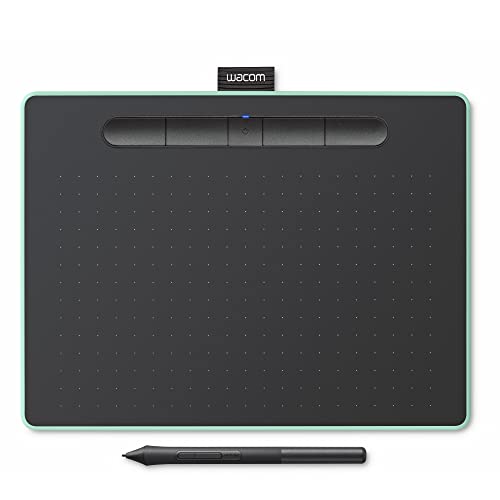
Wacom Intuos Medium Bluetooth Pen Tablet
Best for: students and creators needing portable pen input
- Shortcut Controls
- 4 Customizable ExpressKeys
- Operating System
- Android
- Features
- Bluetooth, Shortcut Keys
- Tablet Type
- Pen Tablet
- Audience
- Students
- Dimensions
- 10.4 × 7.8 × 0.35 inches
This Wacom Intuos Medium is a pen tablet designed for digital creation. It measures 10.4 by 7.8 inches and weighs 14.5 ounces. You can connect via Bluetooth or a USB-A cable. The device uses EMR battery-free pen technology for precision. It includes shortcut keys and works with Android operating systems. This setup suits students and creators who need portable drawing tools.
- Medium size measures 10.4 by 7.8 inches
- Connects wirelessly via Bluetooth or USB-A cable
- Uses EMR battery-free pen technology
- Includes shortcut keys for workflow efficiency
- Weighs 14.5 ounces for portability
- Medium active area limits large-scale drawing space
- Weight of 14.5 ounces adds bulk to bags
- Limited to Android operating system compatibility
- You need a portable drawing tablet for student work
- You prefer wireless connectivity via Bluetooth
- You want a device with included shortcut keys
- You require a large active drawing area
- You need compatibility with Windows or macOS
- You prefer a battery-powered pen system
Verdict: Wacom Intuos Medium Bluetooth Tablet offers a balanced medium size and wireless convenience for students. It fits creators who prioritize portable, battery-free pen precision on Android devices.
Specifications side by side
| Spec | Wacom Intuos Medium Bluetooth Pen Tablet |
|---|---|
| Shortcut Controls | 4 Customizable ExpressKeys |
| Operating System | Android |
| Features | Bluetooth, Shortcut Keys |
| Tablet Type | Pen Tablet |
| Audience | Students |
| Dimensions | 10.4 × 7.8 × 0.35 inches |
| Weight | 14.5 ounces |
| Size | Medium, Wireless |
| Color | Pistachio |
| Model | CTL6100WLE0 |
Frequently asked questions
Does the Wacom Intuos Medium Bluetooth tablet work with Android devices?
Yes, it is compatible with Android operating systems. The listing confirms this feature, allowing you to use the pen tablet with supported Android devices. This makes it a versatile option for creators who prefer working on tablets rather than computers. You get portable pen input without needing a separate computer.
What are the exact dimensions of the Wacom Intuos Medium tablet?
The device measures 10.4 inches in length and 7.8 inches in width. The thickness is 0.35 inches. These specifications define its medium size, offering a balanced workspace. It is compact enough for most desks but provides enough room for comfortable drawing and precise input compared to smaller models.
How much does the Wacom Intuos Medium Bluetooth tablet weigh?
The tablet weighs 14.5 ounces. This weight contributes to its portability, making it easy to move between workspaces. The medium size and lightweight design suit students and creators who need a reliable pen input device that does not take up excessive space on a desk or in a bag.
Is the Wacom Intuos Medium Bluetooth pen battery-free?
Yes, the pen technology is battery-free. It uses Wacom’s EMR technology, which means you never need to charge or replace batteries in the pen. This ensures consistent performance and reduces maintenance. The pen mimics the natural feel of traditional drawing tools for a comfortable creative experience.
What color options are available for this Wacom tablet?
The listing specifies the color as Pistachio. This light green shade gives the device a distinct look. The color choice is a cosmetic detail that may appeal to users who want a tablet that stands out from standard black or white electronics. The design remains functional and professional.
Does this tablet include shortcut keys?
Yes, the device features shortcut keys. These keys allow you to assign frequently used commands for quicker workflow. This feature is useful for students and creators who want to access tools without navigating menus. The inclusion of these keys enhances productivity by streamlining common digital art tasks.
Is the Wacom Intuos Medium suitable for students?
Yes, it is recommended for students. The medium size and wireless convenience make it ideal for educational use. It fits well in dorm rooms or libraries where space is limited. The portable design and reliable pen input support note-taking, digital assignments, and creative projects effectively.


