Wacom Intuos Pro Drawing Tablet Review (2026): A Spec-Based Look
This wacom intuos pro drawing tablet review examines the Small model, a professional-grade input device for digital artists.

What this report covers
- Last updated
- 4 Nov 2026
Figures above are read from the product listings for the models named below. Scores are out of 10, based on listed specifications and buyer feedback.
As Amazon Associates, we earn from qualifying purchases. This means we may receive a small commission at no extra cost to you if you click through and make a purchase.
As an Amazon Associate we earn from qualifying purchases. Links on this page are affiliate links.
This wacom intuos pro drawing tablet review examines the Small model, a professional-grade input device for digital artists. It is defined by two key specifications: the 6-Inch active area and the inclusion of the Pro Pen 2. This battery-free stylus offers 8192 levels of pressure sensitivity and tilt recognition, allowing for precise line weight control. The tablet connects via USB or Bluetooth to Mac and Windows PCs. It also features a Touch Ring and six ExpressKeys for customizable shortcuts. This setup is designed for illustrators and graphic designers who need reliable, lag-free tracking for detailed work.
- Pro Pen 2 with 8192 levels of pressure sensitivity
- 6-Inch active drawing area for compact workflows
- Tilt recognition for natural brush strokes
- Touch Ring and 6 ExpressKeys for shortcut customization
- Bluetooth and USB connectivity options
Good fit for
This tablet suits graphic designers, illustrators, and image editors who work on Mac or Windows systems. The compact 6-inch size is ideal for users with limited desk space who still require professional precision. The Pro Pen 2’s tilt recognition and high pressure sensitivity make it suitable for detailed digital painting. If you prefer wireless freedom, the Bluetooth connectivity allows for a clutter-free setup. The customizable controls help streamline your workflow for efficient creative tasks.
Who can skip it
You should look at another option if you need a screen-based display. This is a non-display tablet, meaning you draw on the surface while looking at your monitor. If you require a larger working area, the Small size may feel restrictive compared to the Medium variation. Users who do not need advanced pressure sensitivity or tilt features might find the specifications excessive for basic tasks. It is also not suitable for standalone use, as it requires a connected computer.
Verdict
The Wacom Intuos Pro Small offers professional pen performance in a compact form. It is a solid choice for digital artists who prioritize precision and wireless connectivity over a built-in screen.
Wacom Intuos Pro Key Specs
6-Inch Screen Size
The active drawing area measures six inches diagonally. This compact surface suits users with limited desk space or those who prefer portability. You get a focused workspace that encourages precise hand movements. Compare this to larger tablets that offer more room but require a bigger footprint. The smaller size is ideal for detailed illustration work where you do not need a vast canvas.
8192 levels of pressure sensitivity
The Pro Pen 2 detects eight thousand one hundred ninety-two distinct pressure levels. This high resolution allows for smooth variations in line weight and opacity. You can create natural-looking strokes that mimic traditional media. This specification is critical for digital artists who need fine control. It ensures your digital drawings look professional and fluid rather than stiff or uniform.
Bluetooth
This tablet supports wireless connectivity via Bluetooth. You can connect it to a Windows PC or Mac without cluttering your workspace with cables. This feature offers flexibility in setup and reduces desk mess. When shopping, check if your device supports Bluetooth for seamless pairing. It allows you to place the tablet anywhere within range for comfortable drawing sessions.
15.8 ounces weight
The unit weighs 15.8 ounces, making it relatively lightweight for a professional device. This weight provides enough stability to prevent sliding during vigorous drawing. It is light enough to move easily if needed. Consider this when comparing portability. A heavier tablet might stay put better, but this balance offers a secure yet manageable feel for most users.
Design and Build Overview
The listing describes the Wacom Intuos Pro Small as a compact, wireless graphics tablet. It measures 11.8 inches in length, 7.75 inches in width, and stands 2 inches tall. The device weighs 15.8 ounces. These dimensions indicate a footprint that fits easily on smaller desks or into travel bags. You can place it alongside your laptop without consuming excessive workspace. The black finish offers a neutral look that blends with most setups.
According to the listing, the unit includes six ExpressKeys and a touch ring. These controls sit on the right side of the pad. You can program them for shortcuts or specific functions. This layout keeps your hands close to the drawing area. It reduces the need to reach for your computer keyboard. The inclusion of multi-touch gestures adds another layer of control. You can zoom or pan using your fingers on the active surface.
The tablet connects via USB or Bluetooth. This wireless option removes cable clutter from your desk. The package includes a battery-free Pro Pen 2. This pen rests in a dedicated stand when not in use. The stand keeps the stylus secure and within arm's reach. The overall design prioritizes efficiency and portability. You get a focused workspace that encourages precise hand movements without unnecessary bulk.
Setup and Daily Use Guide
Setting up the Wacom Intuos Pro Small is straightforward. You can connect it to any Mac or Windows PC using the included USB cable. For a cable-free experience, the device supports Bluetooth connectivity. This wireless option allows you to place the tablet anywhere on your desk without cord clutter. The listing confirms compatibility with both major operating systems, ensuring you can integrate it into your existing workflow easily.
In daily use, the tablet offers multiple ways to control your software. You have six ExpressKeys and a Touch Ring that you can program for specific shortcuts. These customizable buttons let you access tools quickly without reaching for your mouse. The tablet also supports multi-touch gestures. You can use these gestures to zoom, pan, or rotate your canvas, which speeds up your editing process.
The included Pro Pen 2 is battery-free, so you do not need to charge it or replace batteries. It features tilt recognition and 8192 levels of pressure sensitivity. This means your strokes respond to how hard you press and the angle of the pen. The pen also has two customizable side switches for additional control. You receive ten replacement nibs in the box, ensuring you have spares for regular use. The compact 6-inch screen size keeps your hand movements focused and precise. This setup is ideal for graphic designers and illustrators who need reliable, responsive input for their creative work.
Before You Buy This Tablet
You should verify your computer’s operating system before purchasing. The listing specifies Windows compatibility, so Mac users must check driver support separately. This tablet is not a standalone device. It requires a host computer to function. You will need a USB port for initial setup or a Bluetooth-enabled machine for wireless use. Keep the included replacement nibs handy. The Pro Pen 2 is durable, but nibs wear down with heavy use. Regularly clean the surface with a dry cloth to maintain tracking accuracy. Unlike the other 1 tablets in this guide, this unit lacks a built-in display. You look at your monitor while drawing on the pad. This workflow suits artists who prefer physical pressure sensitivity over screen-based feedback. It fits best in a desktop studio rather than a mobile setup. Ensure your desk has enough space for the 11.8-inch footprint.
Check before you buy
- Confirm your computer runs Windows or supports the Mac driver.
- Check for available USB ports or Bluetooth connectivity on your device.
- Ensure your desk has space for the 11.8-inch footprint.
- Verify you are comfortable looking at a separate monitor while drawing.
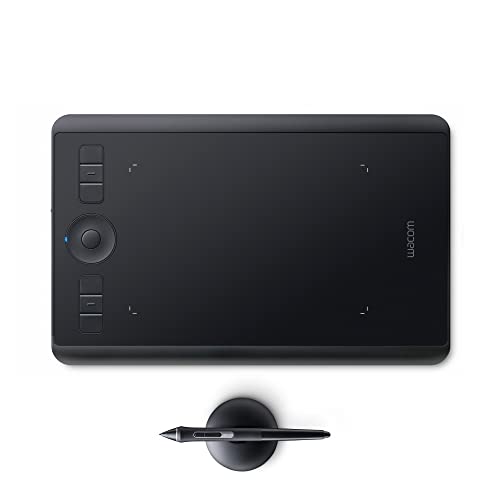
Wacom Intuos Pro Small Bluetooth Tablet
Best for: compact wireless digital art creation
- Pen Pressure
- 8192 levels
- Shortcut Controls
- 6 ExpressKeys, Touch Ring
- Screen Size
- 6-Inch
- Operating System
- Windows
- Features
- Stylus, Stylus Pen, Bluetooth
- Display
- Touchscreen
The Wacom Intuos Pro Small is a wireless graphics tablet designed for creative professionals. It features the Pro Pen 2 with 8192 levels of pressure sensitivity and tilt recognition. The device includes six ExpressKeys and a touch ring for productivity. It connects via Bluetooth or USB to Mac and Windows PCs. This compact unit weighs 15.8 ounces and measures 11.8 by 7.75 inches.
- Pro Pen 2 offers 8192 levels of pressure sensitivity
- Includes tilt recognition and virtually lag-free tracking
- Six ExpressKeys and a programmable touch ring
- Connects via Bluetooth or USB cable
- Battery-free stylus with two customizable side switches
- Small active area measures 6.7 by 10.6 inches
- Height reaches 2 inches in the thicker configuration
- Weight is 15.8 ounces for the small size
- You need a compact tablet for limited desk space
- You require high-precision pressure sensitivity for detailed art
- You prefer wireless connectivity via Bluetooth
- You need a built-in display screen
- You prefer a larger drawing surface area
- You want the thinnest possible profile available
Verdict: Wacom Intuos Pro Small Drawing Tablet fits illustrators who value precision and portability. It delivers professional pen performance in a compact, wireless form factor.
Specifications side by side
| Spec | Wacom Intuos Pro Small Bluetooth Tablet |
|---|---|
| Pen Pressure | 8192 levels |
| Shortcut Controls | 6 ExpressKeys, Touch Ring |
| Screen Size | 6-Inch |
| Operating System | Windows |
| Features | Stylus, Stylus Pen, Bluetooth |
| Display | Touchscreen |
| Color | Black |
| Dimensions | 11.8 × 7.75 × 2 inches |
| Weight | 15.8 ounces |
| Size | Small |
| Model | PTH460K0A |
Frequently asked questions
Does the Wacom Intuos Pro Small have a screen?
No, it does not have a display. The listing identifies it as a tablet with a touchscreen interface, but this refers to touch gestures on the surface, not a visual monitor. You draw on the matte surface while looking at your computer screen. The 6-inch active area is non-visual. This design requires you to look up at your monitor to see your work.
What operating systems does this tablet support?
The data specifies Windows compatibility. You can connect it to Windows PCs for digital art creation. The listing does not explicitly confirm macOS support in the attributes. You should verify driver availability for your specific Mac model before purchasing. This ensures the pen and touch features function correctly on your chosen operating system.
How heavy is the Wacom Intuos Pro Small?
It weighs 15.8 ounces. This weight makes it portable enough for travel while remaining stable during use. The dimensions are 11.8 inches in length and 7.75 inches in width. The device stands 2 inches tall. These specs indicate a compact footprint that fits easily on most desks or into bags.
Can I use this tablet wirelessly?
Yes, it supports Bluetooth connectivity. You can connect it to your computer without a USB cable for a cleaner workspace. The listing highlights Bluetooth as a key feature. You can also use the included USB cable for initial setup or charging if needed. This wireless option allows flexible placement on your desk.
What is the size of the active drawing area?
The active area is 6 inches diagonally. This is classified as the Small size in the Wacom lineup. It provides a focused workspace suitable for detailed illustration. The physical device measures 11.8 by 7.75 inches to accommodate this area. This compact size is ideal for users with limited desk space.
Is the stylus included with the tablet?
Yes, the listing includes a Stylus Pen. The review mentions the Pro Pen 2, which is battery-free. You do not need to charge the pen for basic operation. The attributes list Stylus as a feature. This pen offers 8192 levels of pressure for precise control over your digital artwork.
What color is the Wacom Intuos Pro Small?
The device is Black. The listing specifies the color as Black for the Small Bluetooth Tablet. This neutral color blends with most office or studio environments. The matte finish on the surface helps reduce glare while you draw. The overall design is sleek and professional.


